A class timetable is printed more often than almost anything else a gym, yoga studio or dance school puts on paper. It goes on the wall by the studio door, in a stand at the front desk, in the window, on flyers left in cafés, and it changes every term, every season, or whenever a teacher leaves. The booking link behind it changes too, and not always when the timetable does.
This guide is about the QR code on that timetable: what it should open, the link that quietly stops working after one class, how big the code needs to be for people standing a metre back from a wall, one code per class type to see what people are actually interested in, trial-class offers, and the switch-over week when last term's printed codes are still on every wall and table in town.
The 'Book' link you copied may only work once
The quickest way to get a booking link is to open your booking system, find the class, press Book and copy the address from the browser. On many systems that address is not the class. It is one dated session of the class: Tuesday's 6 pm Vinyasa, not Vinyasa.
We checked five public booking links from small yoga studios on two booking systems on 29 October 2026, the kind of address a studio copies into a QR code generator:
All five answered with a normal page (HTTP 200), so a link checker would call every one of them fine. Four of them open a single class that is either over or months away. Someone who scans a code holding one of those sees the right class name, a date that has passed and no button. Most people don't read the date; they decide the booking system is broken, or that the class is full, and walk off.
The fix is to link to a page that never goes out of date: the schedule page, or the schedule filtered to one class type if your system has that. To find it, open your public schedule, pick the filter (class type, teacher, location), and look at whether the address changes. If it does, that filtered address is your per-class link. If it doesn't, the filter only lives in the page and you can only link the whole schedule.
What the code on a timetable should open
Two things stand out. Members want the schedule with as few taps as possible before booking. Newcomers want to know what a first class costs and how to start, which is usually a different page (an intro offer, a trial pass, a 'new here?' page). A single code can't serve both well, so the timetable on the wall and the flyer in the café shouldn't hold the same link.
Whatever it opens, it should open without a sign-in first. Some booking systems ask for an account before showing the schedule. If yours does, link a schedule page on your own website (most systems have an embeddable widget) so people see classes and times first and sign in only to book.
How big the code has to be on a wall timetable
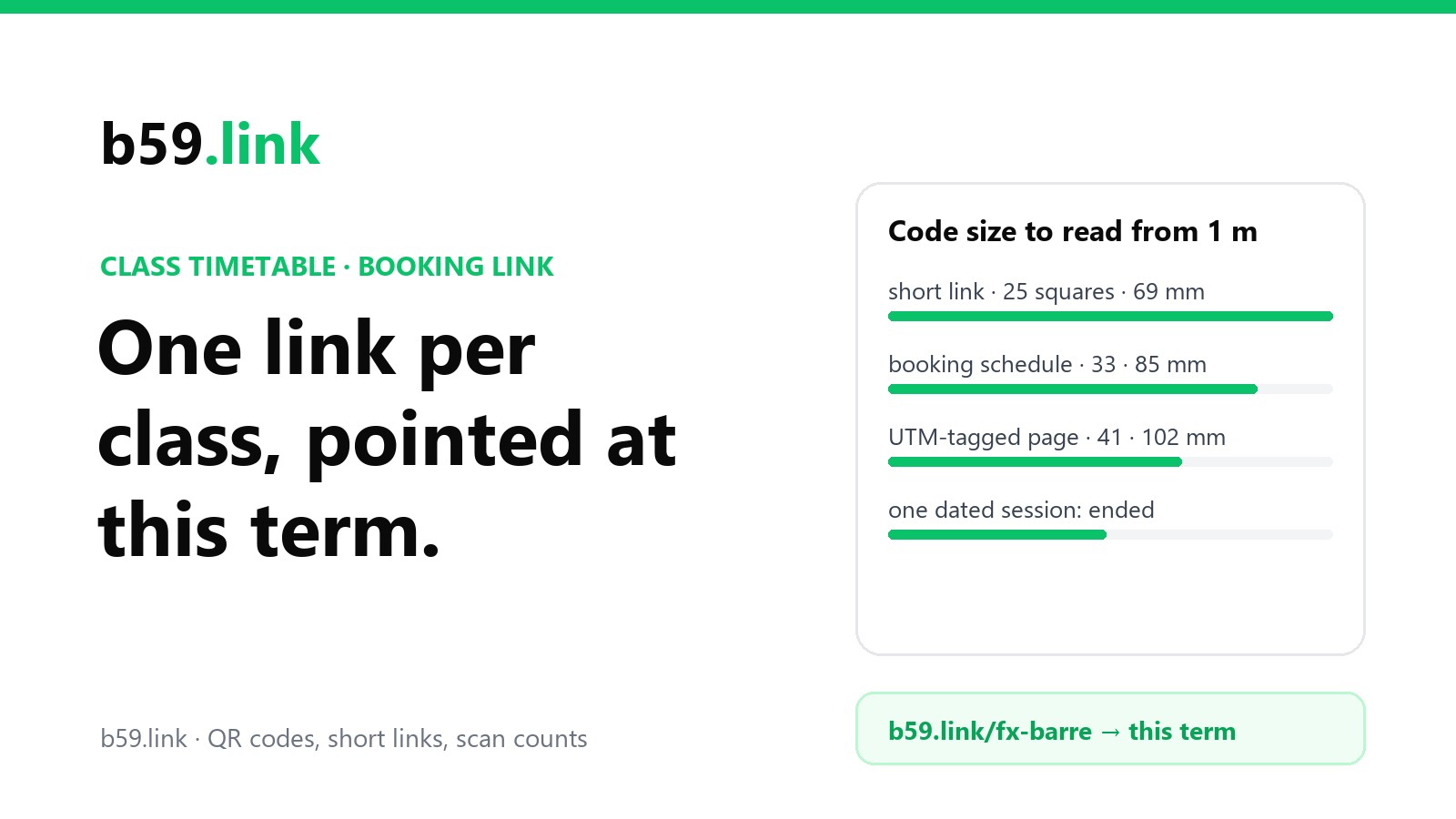
People read a timetable on a wall from about a metre away, often over someone's shoulder. Then they raise a phone and expect it to read from where they are standing. A 20 mm code in the corner of an A4 sheet won't.
We encoded six kinds of link at error correction level M and worked out how big one square is in a 20, 40, 70 and 100 mm space (the space includes the 4-square blank margin around the code), and how far away a phone can be while still seeing 3 camera pixels per square. The camera figure is the one from our presentation slide article: a 1920-pixel phone frame across a 67° field of view sees about 1,445 pixels per metre of wall at 1 metre.
Turned round, here is the space a code needs for people to scan it from a given distance:
So, for an A4 timetable on a wall, a code of about 70 mm holding a short link reads from a metre. On an A3 sheet or a window poster read from the pavement, go to 100 mm or more. The UTM-tagged address, which people add so their analytics can tell the timetable apart from other traffic, makes the code 41 squares across and costs a third of the reading distance; a short link that adds the tags on the way through gives you both.
These are good-light numbers for a code printed in dark ink on white. Gyms are often lit for mood, studios for calm and windows reflect. Matte paper or a matte laminate pouch helps a lot more than gloss: a gloss sheet behind a spotlight shows a white streak right across the code.
One code per class type, to see what people want
A timetable with one code tells you how many people scanned it. A timetable with a code per class type tells you which classes people are curious about, which is the thing you actually need when planning next term.
Layout that works on A4 or A3: one big code (70 mm) for the full timetable at the top or bottom, then a strip of smaller codes, one per class type, each labelled with the class name and its own short address. An A4 sheet (210 mm wide) fits four 40 mm codes across with gaps; an A3 sheet (297 mm) fits six. At 40 mm a short link reads from 58 cm, so people step up to it, which is fine: by then they have already chosen the class.
Each small code holds a short link like b59.link/fx-barre that opens your schedule filtered to barre. Here is how the counts read after four weeks. The figures below are made up to show the reading, not from a real studio; bookings come from your booking system's report for the same class types and dates:
The useful part is the gap between scans and bookings. Reformer Pilates gets plenty of curiosity and few bookings, which usually means the class is always full, the price is a shock, or the first-time step (an intro session) isn't obvious on the page. Boxfit's problem is earlier: nobody looks. Those are different fixes, and neither shows up in a booking report alone, because the report only counts people who got all the way through.
Two cautions on reading scan counts. Members scan too, so a popular members' class can show many scans and few new bookings without anything being wrong; the strip on the wall mostly measures members, the flyer codes mostly measure newcomers. And some phones open a link twice (a preview, then the page), so treat small numbers as approximate. Our article on one short link per channel goes through what click counts can and can't tell you.
Trial classes and intro offers: their own link
If you run a trial class, an intro week or a 'first class free', give it its own short link and put it on everything a stranger sees: window, flyers, the front-desk handout. Keep it off the members' wall timetable, where it only adds noise.
How many trials become members is the number studios most want and the one with the least published data. ABC Glofox, whose software runs thousands of gyms and studios, wrote in March 2026 that published benchmarks are hard to find and that operators report anywhere from 20% to 50% trial-to-member conversion, depending on the business and the trial. Their worked example is worth doing with your own numbers:
That ignores members who leave, so treat it as the top of the range. The same article suggests paid trials of $10 to $30 for a week and following up within hours, not days. A short link per place the offer is printed (window, café flyers, the school newsletter) tells you which places bring trial bookings at all, so the next print run goes where it worked. Our noticeboard poster article covers what to put on posters in shared spaces and when to take them down.
Term change: keeping last term's codes pointing at this term
Here is the part that catches everyone. When the timetable changes, you print a new one for the wall. The old codes don't disappear: they're on flyers in a café you visited in September, on a window sticker, on the back of business cards, in photos people took of the timetable, and on the sheet someone forgot to take down in the changing room. A dance school running three terms and a summer programme prints four editions a year; a gym that changes its group timetable each season does the same.
Count the printed places a small studio typically has and what each costs to fix when the link inside changes:
Only the first row gets fixed by reprinting. Everything else keeps whatever link was in it for as long as the paper survives. That's why the code should hold an address you control: a short link, or a page on your own domain, never the booking system's own address. On term change day you change where the short link points, and every code ever printed with it opens the new timetable.
A simple routine for the switch:
1. Two weeks before: build next term's schedule in the booking system and note its address (and the filtered address for each class type).
2. Switch day: change each short link's destination to the new schedule. Leave the old term's codes alone; they now open the new one.
3. Class retired? Point its short link at the nearest class that replaced it, or at a page saying where it went ("Thursday barre moved to Wednesdays"), never at an error page.
4. New class type? Make a new short link for it; don't reuse a retired class's link, or its old flyers will send people to the wrong class.
5. Check every link in one go after the switch. Our link list checker follows each one and shows where it ends up.
Changing booking system without reprinting
Studios change booking systems more often than they'd like, usually over fees. When they do, every address pointing at the old system goes: a studio moving from Mindbody to Momence doesn't keep clients.mindbodyonline.com/...?studioid= working once the account closes, because that address belongs to Mindbody, not the studio. One aerial studio's notice to clients after its move to Momence is typical: memberships, class packs and future bookings carried across, password-reset emails to every client, a new app to download, and nothing about the codes already on paper.
Links rot even without a move. Pew Research Center checked web pages that existed in 2013 and found 38% of them could no longer be reached by 2023. For a studio's printed codes, the cause is nearly always the same: an address that belonged to someone else.
With short links on everything, the move is one evening's work: list your short links (one per printed place, one per class type, one for the trial offer), and change each destination to the new system's matching page on the day the new system goes live. If the new system has no page that matches an old one (it has no per-class filter, say), point that link at the nearest page and put the class type in the page's heading or your own website's schedule. Our article on retiring a page without breaking links covers the general case.
Checklist
1. Link the schedule (or a per-class filtered schedule), never a copied Book link for one dated session.
2. Members' timetable opens the schedule; window, flyers and handouts open the trial or intro offer.
3. No sign-in before people can see classes and times.
4. A short link inside the code: 70 mm on a wall timetable reads from a metre; 100 mm+ for windows.
5. One short link per class type on a strip under the timetable, labelled with the class name and short address.
6. One short link per place a trial offer is printed, so you know which places bring people in.
7. Matte paper or laminate, dark ink on white, away from spotlights.
8. On term change day, change destinations, don't print new codes; never reuse a retired class's link.
9. Changing booking system: change every short link's destination the day the new one goes live, then check them all.
Make one short link and QR code per class type, sign in so you can change where they point each term, and see which classes people scan. Free.
Make a QR codePrinting the same offer in many places? Make one tagged short link per place in one go.
Open campaign linksSources
- Booking link test: five public class links on Momoyoga and Punchpass, fetched 29 October 2026 (page titles and the pages' own booking state: hasPassed, isBookable, bookableAt). Studio names left out.
- QR versions and sizes: our own encoding with segno 1.6.6 at level M, 4-square margin; reading distance at 3 camera pixels per square, 1,445 px per metre at 1 m (1920 px across 67°), as in our slide QR article.
- Mindbody link shape clients.mindbodyonline.com/classic/ws?studioid=12345: Replo's Mindbody integration guide.
- Trial conversion range (20-50%), worked example ($60 membership, 50 trials, $3,600 a month, $43,200 a year), paid trials $10-30 a week and same-day follow-up: ABC Glofox, 'Gym trial conversion rates', 20 March 2026.
- Studio moves from Mindbody to Momence (memberships, packs and future bookings moved; password-reset emails): an aerial studio's client newsletter on Kit, read 29 October 2026.
- Link rot: Pew Research Center, 'When Online Content Disappears', 17 May 2024 (38% of 2013 pages unreachable in 2023).