A QR code on a machine gets scanned by people who are standing next to it with a problem. The new starter wants the two-minute video on threading the bandsaw. The gym member wants to know why the rowing machine shows an error. The office manager wants to tell someone the printer is jamming again, without finding out who that someone is. The technician wants to know what was done to it last time.
This guide covers what each of them should get from one label, how big the code has to be on the asset tags people actually buy (with our own test of scratched, greasy and torn labels), which label materials survive oil and daily wipe-downs and what they cost, how to move a manual without relabelling forty machines, and what a public link on a machine should never open.
Who scans a machine, and what for
The pattern is the same everywhere: one code per machine, opening one short page for that machine, with three or four buttons on it. Not one code per document. A label with three codes (manual, video, fault form) is three things to size, print, keep clean and keep pointing at the right place, and people scan the first one they see anyway.
The page itself can be very plain: the machine's name and asset number at the top (so the person knows they scanned the right one), then How to use it, Manual (PDF), Report a problem, and for staff a Service log link that asks for a sign-in. A shared document, a page on your own site or a page in whatever booking or maintenance tool you already use all work, as long as you can change it without touching the label.
What's in the code decides how small the label can be
Asset tags come in a handful of sizes. The common ones run from 0.75 × 1.5 inches (19 × 38 mm) through 1 × 2 inches (25 × 51 mm) up to 2 × 4 inches. On a rectangular tag the code sits in a square at one end, so the tag's height is the space for the code, and that space has to include the white margin of four squares on each side, or scanners struggle to find the code's edge.
We encoded six things people put behind an equipment code at error correction level M and worked out the size of one square in a 19, 25 and 38 mm space. For reading distance we used the same camera maths as our conference badge article: a phone's main camera across about 67° with a 1,920-pixel preview gives 1.445 pixels per millimetre at 1 metre, and a label that's a bit worn needs about 3 pixels per square (2 is enough for a clean one facing the phone).
A plain asset number makes the smallest code, but a phone camera just shows the text PRS-0007; it only means something to a maintenance app that looks it up. For anyone else it's a dead end, so it suits a company's own scanner, not a member of the public.
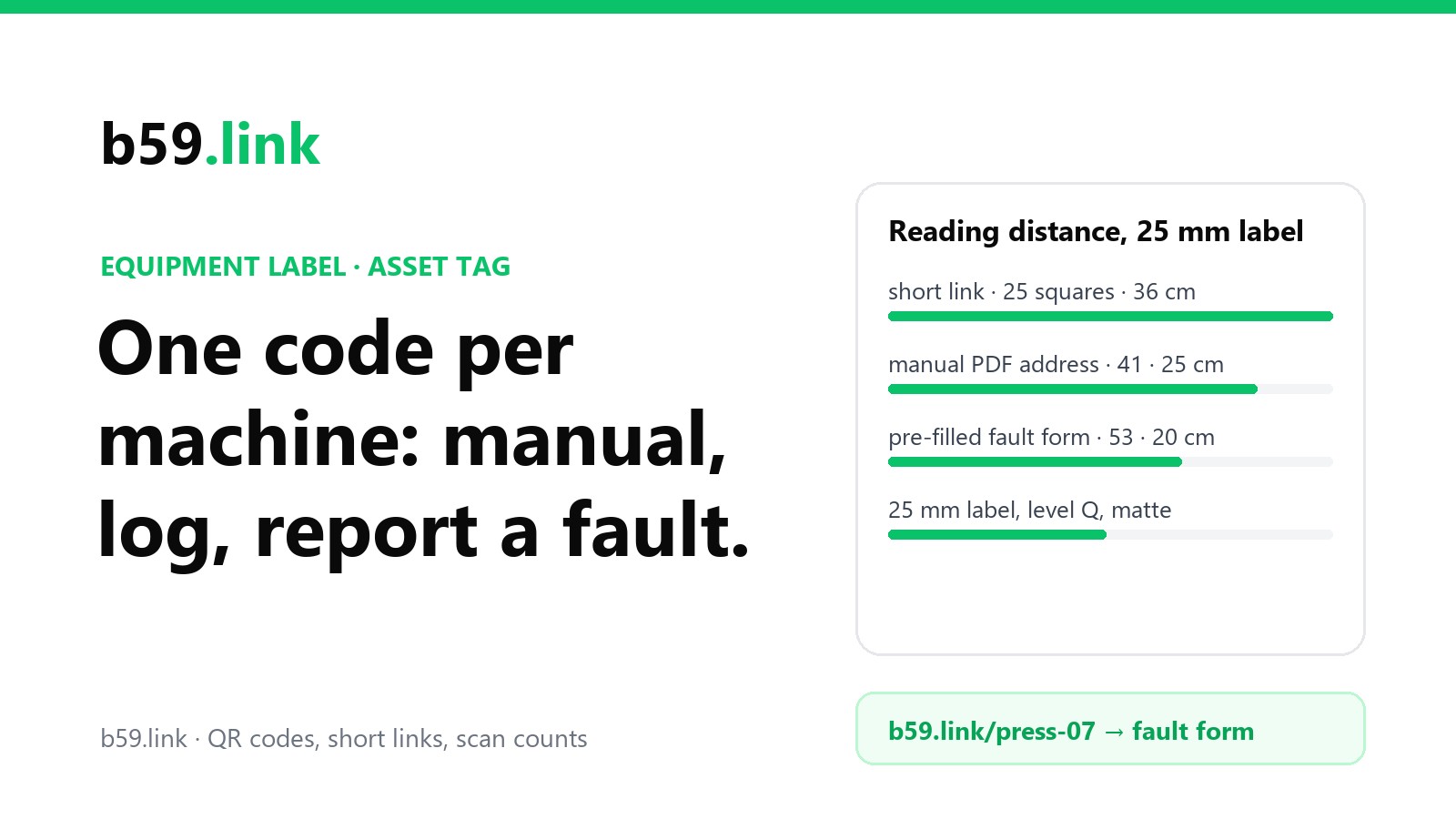
The pre-filled fault form is the tempting one: the form opens with the machine already named. It also makes a 53-square code, which on a 1 × 2 inch tag means holding a phone 20 cm away, steady, over a label that may be on the back of a machine. The same form behind a short link gives a 25-square code that reads from 36 cm, and the person still lands on the form with the machine filled in. The short link is only a forwarding address: the long, pre-filled form address lives on the link, not in the print.
Our test: labels that have been on a machine for a year
A fresh label on a desk scans whatever is in it. A label on a lathe, a cable machine or a floor scrubber gets scratched, filmed with grease, polished by gloves and sometimes has a corner peeled off. We drew the short-link code and the pre-filled form code on a 25 mm label at each error correction level (L, M, Q and H: they can rebuild roughly 7, 15, 25 and 30% of the code), then damaged them: thin scratches 0.25 mm wide where the ink was worn through, a film of grime that turns the white blotchy grey (leaving a grey gap of 90 and then 60 out of 255 between 'black' and 'white'), a band of oil sheen across about a tenth of the code, and a torn-off corner covering 8, 15 and 25% of the code. Each was tilted at random by up to 12°, blurred, given sensor noise, saved as a JPEG as a phone would see it from 20 cm, and handed to the open-source ZXing decoder. 80 tries per cell; the figures are the share that decoded.
What it says:
- Dirt is where the long code loses. With the grime leaving a grey gap of 60, the short link still decoded 47 to 82% of the time and the pre-filled form never did, at any level. Big squares keep their contrast in a blurred, dirty photo; small ones smear into grey. That's the most common way a workshop label dies, and it's the strongest reason to keep the code short.
- Scratches hurt both, and neither code won clearly: 4 scratches cost a third to a half of the reads on the short link and up to a quarter on the long one, 8 cost more. Higher levels helped a little. The fix is a protective layer over the print, not a cleverer code.
- A torn corner is what error correction is for. At L, losing 8% of the code was fatal; M survived 8% but not 15%; Q survived 15%. A quarter gone beat every code except the big level H one, whose extra alignment marks spread the damage; the small level H code lost its only alignment mark with the torn corner.
- Oil sheen beat everything. A glossy band across a tenth of the code dropped reads to 0-55%. A matte overlaminate, a wipe with a rag, or tilting the phone are the only answers.
- Level Q on a short link is the sensible default for a machine: 100% when clean, it survives a 15% tear, it held up nearly as well as M under dirt, and the code is still only 29 squares across.
Label materials: what survives oil and daily wipe-downs
The label matters as much as the code. Paper and plain vinyl are fine on an office printer and fail quickly on a cable machine wiped with disinfectant twice a day or a press that weeps hydraulic oil. Prices below are 'starting at' prices for 100 QR asset tags at one US label seller (TagYourAssets), checked on 27 October 2026; the durability notes are the makers' own published claims or tests.
One published test is worth knowing: Brady's B-423 polyester was soaked for 30 minutes in gasoline, SAE 20 oil, JP-8 jet fuel and MIL-H-5606 hydraulic oil, then rubbed with a cotton swab, with 'no visible effect or slight print removal'. That's the kind of figure to ask a label seller for: a test in the liquid your machine actually leaks, not 'chemical resistant'.
Choosing is mostly about the worst thing that touches the label:
- Office kit (printers, coffee machines, projectors): vinyl or plain polyester.
- Gym and studio equipment, wiped with disinfectant several times a day: overlaminated polyester or polycarbonate, matte. Put the label where hands don't rest, not on the grip or the seat.
- Workshop machines with oil, coolant and swarf: anodised aluminium, or overlaminated polyester on a flat, degreased surface, away from where coolant runs.
- Rental tools and outdoor kit: aluminium, riveted or screwed where you can, because adhesive on a tool that gets thrown in a van peels at the corners first (and the test above shows what a peeled corner costs).
Wherever it goes: at eye or chest height, on a fixed panel rather than a guard or door that gets removed, not on a hot surface, and with the asset number and the short address printed in words beside the code, so someone can type b59.link/press-07 if the code is too dirty to scan. Our article on printing a QR code that scans covers quiet zones and print sizes in more detail.
Moving the manual without relabelling every machine
A code that holds the maker's PDF address breaks when the maker reorganises its website, and makers do. Pew Research Center checked pages sampled from the web for each year from 2013 to 2023 and found that 38% of pages that existed in 2013 were gone by late 2023, and about a quarter of all pages from that decade. A machine bought in 2016 is very likely to outlive the address of its manual.
Two habits fix it:
1. Keep your own copy of every manual and how-to video link, in storage you control, named by asset number.
2. Put a short link you can change on the label, pointing at the machine's page (or straight at your copy). When the manual moves, the page changes; the label doesn't.
What relabelling costs, for a small gym with 40 machines whose labels hold the maker's addresses directly: 40 overlaminated polyester tags at $1.79 is $71.60 plus shipping, and if peeling the old label, cleaning the spot and placing the new one takes 5 minutes a machine, that's 3 hours 20 minutes of someone's time, with wrong labels on the floor until it's done. Changing where 40 short links point takes a few minutes and nothing on the floor changes. The same holds when the fault form moves from a Google Form to a proper maintenance app.
Rules are moving the same way. The EU's new Machinery Regulation (2023/1230), which applies from 20 January 2027, lets makers supply instructions digitally instead of on paper, as long as the machine or its paperwork says how to reach them, they can be downloaded and printed, they stay available for the machine's expected life and at least ten years, and a paper copy is sent free within a month if the buyer asks at purchase. Machines for non-professional users still need the essential safety information on paper. That means more manuals that exist only at a maker's web address, which makes keeping your own copy more important, not less.
A safety note for workshops: in the US, OSHA's lockout/tagout standard (29 CFR 1910.147) requires documented energy-control procedures for machines that need them. A code that opens the procedure is a convenience on top, not a replacement: keep the printed procedure where your safety programme says it goes, because the phone might be flat and the page might be down.
Reporting a fault: what the form should ask
The report is the button people use most, and the one most often set up badly: a long form, a sign-in, or a generic 'contact us' that doesn't say which machine. Keep it to what the person fixing it needs:
Behind the form, decide who gets the report and how fast. A fault marked not safe should reach a person who can put a sign on the machine within the hour, not sit in a shared inbox until Monday.
Then use the counts. With one short link per machine, the scans tell you two things the fault form alone doesn't. Machines that get scanned a lot but rarely reported are usually confusing rather than broken: people are opening the how-to video, so the fix is a better video or a one-line printed instruction. Machines whose reports cluster are the ones to replace or put on a service contract. A link per machine, rather than one link for the whole floor, is what makes that visible; our article on one short link per flyer, post and podcast explains the idea for marketing, and it works the same on a gym floor.
What a public link on a machine should never open
Anyone can photograph a label: a visitor, a delivery driver, a member. Whatever the code opens, assume it's public. Things that end up behind equipment codes and shouldn't:
- Your maintenance system's own addresses with company or account IDs in them, or anything that opens its sign-in page. A request portal built for the public is fine; the admin side isn't.
- A shared folder ('anyone with the link can view') when you meant to share one PDF. Folders grow: invoices, contractor quotes and the alarm code end up in the same place.
- The service log, if it names technicians, their phone numbers, or what's wrong with the security kit. Keep it behind a sign-in and only link to the sign-in.
- The machine's network details: its IP address, the admin page of a networked printer, or the Wi-Fi password it uses.
- A form that writes straight into a sheet everyone can read, so one report shows every other report.
The split that works: a public page with the manual, the how-to video and the fault form, and a staff page behind a sign-in with the log and the parts. One code, opening the public page, with a 'Staff: service log' link on it.
Codes on shared equipment can also be covered with someone else's sticker that opens a fake 'report a problem' page asking for a card number. A printed address in words, labels that show tampering and a walk-round check help; our article on fake QR code stickers has the details, and our free printed code register lets you photograph each label on a walk-round and see at once which ones still open what they should.
Checklist
1. One code per machine, opening one page for that machine: how-to, manual, report a fault, staff log behind a sign-in.
2. A short link you can change on the label, not the maker's PDF address or a long pre-filled form.
3. Level Q error correction; a 25 mm space (1 × 2 inch tag) reads from about 36 cm, a 19 mm space from 28 cm.
4. Print the asset number and the short address in words next to the code.
5. Material by the worst thing that touches it: vinyl in offices, overlaminated polyester or polycarbonate in gyms, anodised aluminium on oily machines and rental tools. Matte, not gloss.
6. Keep your own copy of every manual; repoint the link when the maker's address moves.
7. Fault form: machine filled in by the link, what's wrong, is it safe, optional photo and name.
8. Nothing behind the code that you wouldn't pin on the noticeboard.
9. Look at scans per machine every month: lots of scans and few reports means a confusing machine, clustered reports mean a failing one.
10. Walk round twice a year: clean the labels, replace any with a peeled corner, and check each still opens the right page.
Make one short link and QR code per machine, change where it points when the manual moves, and see which machines get scanned. Free.
Make a QR codeWalking round with a phone? Photograph each label and check it still opens the address on your list: nothing is uploaded.
Open the code registerSources
- Asset tag sizes: MyAssetTag catalogue (rectangular tags from 0.5 × 1 to 3 × 5 inches; 0.75 × 1.5, 1 × 2 and 2 × 4 inches common).
- Label prices: TagYourAssets, 'QR Code Asset Tags', 100-tag 'starting at' prices, checked 27 October 2026.
- Strong Asset Tags product list: 2 mil polyester tags rated for two years outdoors.
- Camcode, Metalphoto anodised aluminium product sheet: over 20 years expected exterior life, Taber abrasion (1,000 g, 7,000 cycles), 700 h salt spray.
- Brady, B-423 glossy polyester datasheet: 30-minute immersion in gasoline, SAE 20 oil, JP-8 and MIL-H-5606, then a swab rub.
- Pew Research Center, 'When Online Content Disappears', 17 May 2024: 38% of pages from 2013 no longer accessible; about a quarter of pages from 2013-2023.
- Regulation (EU) 2023/1230 on machinery, applying from 20 January 2027: digital instructions, paper copy on request at purchase within one month, availability for the expected lifetime and at least ten years (summaries by instrktiv and tekom).
- OSHA 29 CFR 1910.147, the control of hazardous energy (lockout/tagout): documented energy-control procedures.
- QR versions, square sizes, distances and the wear test: our own, October 2026, with the segno encoder and the ZXing decoder (zxing-cpp).