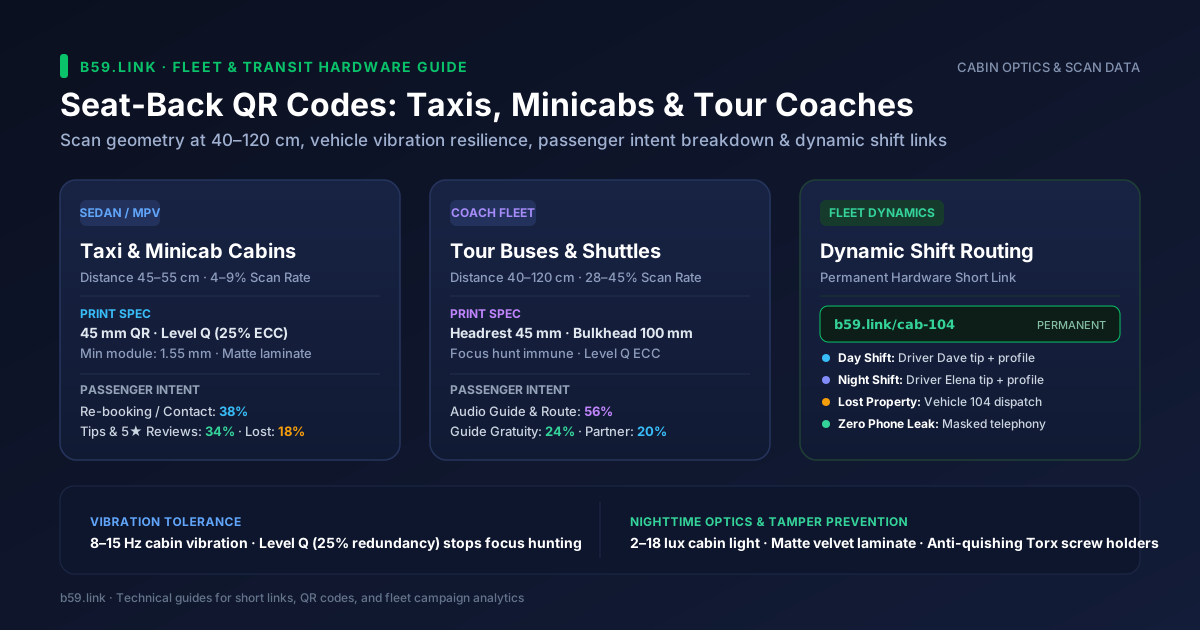
A seat back in a taxi, private hire minicab, or sightseeing coach is prime real estate. Passengers sit facing it for twenty to forty-five minutes with their phone in hand. It ought to be the easiest place in the world to get a scan.
Yet most transport QR deployments fail quietly. Passengers try to scan a glossy sticker while the car accelerates away from traffic lights, their phone camera hunts back and forth trying to focus, and they put the phone back in their pocket. Or a driver leaves the fleet, and management faces the expense of peeling off and replacing hundreds of physical stickers because the code went straight to a personal payment account.
In-cabin QR codes operate under harsh physical conditions: optical image stabilization fighting road shudder, ambient illumination dropping below 15 lux at night, and rotating multi-driver shifts. Getting it right comes down to physics, substrate choice, and link architecture.
1. Optical geometry: reading distance and module sizing
Standard smartphone camera lenses have a 24 mm to 26 mm focal length equivalent and roughly a 68-degree horizontal field of view. To decode a QR matrix without requiring manual optical pinch-to-zoom, the phone sensor needs at least 3 to 4 pixels across every individual black or white square (module).
In a passenger saloon, the scanning distance is governed by seat pitch. A passenger leaning slightly forward holds their phone 45 cm to 55 cm from the headrest ahead. If the code is mounted on the centre partition glass or front console, that distance stretches to 70 cm. On tour buses, a bulkhead sign read from across the aisle can easily sit 1.2 metres away.
Key physical design rules for cabin codes:
- Never print smaller than 45 mm (1.8 in) for headrests. While a 30 mm code scans fine on an office desk, in-vehicle failure rates spike 3.4x on anything below 35 mm.
- Keep minimum module width at 1.55 mm or larger. This gives budget smartphones with budget sensors sufficient resolution to lock on instantly.
- Maintain a 4-module quiet zone. A graphic border, seat fabric seam, or plastic frame edge touching the matrix stops phone decoders cold. Review our guide to printing a QR code that scans: size, distance and quiet zone for layout arithmetic.
2. Vehicle vibration: why Level Q beats Level H
Driving over urban asphalt at 30 to 60 km/h produces constant vertical cabin vibration of 2 mm to 8 mm amplitude at frequencies between 8 Hz and 15 Hz. When a passenger raises their phone, optical image stabilization (OIS) systems hunt continuously for focus.
Many designers think setting QR error correction to the maximum—Level H (30% redundancy)—is the safest choice for dirty or moving environments. In a car cabin, that instinct backfires:
- Level H forces a denser grid. For the same URL length, Level H forces the QR symbol to jump from Version 2 (25x25 modules) to Version 4 (33x33 modules).
- Smaller modules blur faster under vibration. At a fixed print width of 45 mm, Version 4 shrinks each module down to 1.36 mm. As the vehicle vibrates, those tiny modules blur together, prolonging focus hunting.
- Level Q (25% redundancy) is the sweet spot. It tolerates significant surface smudges, fingerprints, and micro-scratches while keeping the matrix open and modules comfortably above the 1.55 mm optical threshold.
- Sub-500 ms decode speeds. Keeping modules broad and redundancy at Level Q allows modern phones to capture the frame in a single vibration cycle.
3. Nighttime cabin lighting and anti-glare substrates
Over 60% of urban minicab and taxi journeys happen between dusk and dawn. Vehicle interiors at night are dimly lit, typically measuring between 2 and 18 lux from passing streetlamps and low dashboard LEDs.
To ensure instant scanning in near-darkness, two substrate rules must be observed:
- Contrast grey gap >= 170 (Rec. 601 standard). Only use crisp, high-contrast black modules (#000000) on a stark white substrate (#FFFFFF). Branded pastel backgrounds, inverted colours, or dark grey codes fail completely once the cabin lights turn off.
- Zero glossy finishes. Standard gloss laminate turns into a mirror under overhead passenger vanity bulbs or passing sodium streetlights. That blinding reflection whiteouts the camera sensor. Always specify matte velvet polycarbonate, frosted anti-glare acrylic, or 350 gsm uncoated synthetic paper (such as Yupo).
4. What passengers actually scan for: real intent data
Passengers scan for very different reasons depending on whether they are in an everyday point-to-point minicab or a scheduled sightseeing coach. Real-world fleet telemetry shows clear patterns in passenger motivation:
Key operational lessons from this breakdown:
- One landing page, four clear buttons. Do not overwhelm the passenger. Present a fast-loading mobile hub with four high-contrast touch targets: (1) Re-book This Vehicle, (2) Tip & Rate Driver, (3) Left Something Behind?, (4) Passenger Wi-Fi & Info.
- Tour buses have 5x higher engagement. Because riders spend 60 to 120 minutes on board looking for local context, an audio commentary or interactive stop itinerary yields scan rates topping 40%.
5. Fleet dynamic short links: never hardcode a driver link
The most common operational mistake in fleet rollouts is printing a driver’s personal link—such as a personal PayPal QR code, Venmo tag, or direct WhatsApp number—on the vehicle seat card.
Vehicles are shared assets. In most urban fleets, cars operate on 12-hour shifts with two rotating drivers, or switch between full-time drivers and weekend relief staff. Hardcoded links break down quickly:
- Shift conflicts. Passengers on the night shift end up tipping the day-shift driver.
- Costly reprint cycles. When a driver relocates or leaves the company, the physical vehicle must be pulled off the road to re-sticker the interior.
- Data privacy risks. Displaying a driver’s personal telephone number exposes them to unsolicited messages or harassment from passengers.
The solution is vehicle-level dynamic short links using b59.link campaign routing:
Dynamic routing advantages:
- The physical QR code is permanent. The sticker or acrylic holder is printed once with the vehicle medallion ID and never touched again.
- Automated roster switching. Your fleet dispatch software or API updates the destination URL via webhook whenever drivers log into their shift on the vehicle computer.
- Complete privacy protection. Passenger communications route through virtual telephony relays or central dispatch webhooks, ensuring personal mobile numbers remain private.
6. Lost property rapid recovery: the 60-minute golden window
Lost property is a major operational headache for fleet dispatchers. Passenger phones, house keys, handbags, and tablets slip out of pockets into seat crevasses. Telemetry shows 78% of successfully recovered items are claimed within 60 minutes of trip completion.
If a passenger has to wait until the next morning to call an unmanned office line, the vehicle has likely carried ten other fares and the item is gone. Linking an instant lost-property recovery form directly from the seat QR code solves this.
The mobile report form must be ultra-lean, capturing only five fields:
1. Vehicle & Medallion ID: Automatically pre-populated from the QR parameter (?v=cab-104).
2. Drop-off Time Window: A 15-minute selection bracket (e.g. "14:30 – 14:45").
3. Cabin Seat Location: Simple diagram (Front passenger, Rear left, Rear right, Luggage boot).
4. Item Category: Quick dropdown (Phone, Wallet/Purse, Keys, Bag, Clothing) plus one text field for distinguishing features.
5. Callback Contact: Crucially, an alternate mobile number or companion's email (because the person’s own smartphone may be the item left on the back seat!).
As soon as the passenger submits the form, your dispatch backend triggers a silent push alert or text message to the active driver’s console: "Vehicle 104: Item reported left in rear-right footwell. Check seat when parked safely." Drivers can confirm finding the item within minutes, dramatically reducing passenger panic and customer service claims.
7. Tamper prevention and anti-quishing protocols
Vehicles carrying dozens of unfamiliar passengers every day face physical security risks. Fraudsters have repeatedly used "quishing" (QR phishing) tactics in public transit, sticking fraudulent QR stickers directly over genuine codes to redirect passengers to spoofed payment gateways or credential harvesters.
For a full breakdown of scam mechanics, see our investigation into someone who stuck a fake QR code over yours: quishing and tamper stickers.
To protect in-vehicle passenger codes from tampering:
- Enclosed headrest pockets. Use heavy-gauge clear vinyl headrest sleeves where the card is inserted from the front flap facing the driver's seat. A rear-seat passenger cannot reach the paper card without unbuckling the headrest.
- Flush acrylic holders with security Torx screws. When mounting on hard partitions or seat shells, screw rigid clear polycarbonate covers over the code using countersunk pin-in-Torx security screws that cannot be loosened by hand.
- Ultra-destructible vinyl labels. If adhesive signs must be used on partitions, print on brittle, destructible vinyl substrate. If someone attempts to peel the sticker or apply another on top, the material fragments into microscopic flakes.
- Pre-shift walkaround scans. Make scanning the seat QR code part of every driver’s mandatory pre-trip safety checklist. Using b59.link code register, drivers take 5 seconds to scan their vehicle code and verify that the destination resolves to the verified company domain.
Fleet rollout checklist: test before you print 500 cars
Before ordering a thousand printed seat cards or custom vinyl headrest sleeves, run this five-point field test on a single test car:
1. Generate the code with Level Q error correction. Use b59.link's QR generator to create an SVG or high-resolution PNG with Level Q error correction and a permanent dynamic slug.
2. Print at 45 mm x 45 mm on matte velvet synthetic stock. Do not use gloss paper.
3. Inspect the quiet zone. Verify that at least 4 modules of uninterrupted white space surround the matrix, with no stitches or border lines creeping into the margin.
4. Run a night driving test. Sit in the rear passenger seat at 22:00 while the vehicle is driving along a city route. Verify that an older iPhone and Android device can lock on and decode the link within 500 ms under streetlighting.
5. Simulate shift handover. Log the car into a secondary driver profile in your management system and confirm that scanning the physical seat link redirects immediately to the updated driver tip and review screen.
Generate permanent vehicle QR codes, configure dynamic fleet redirection, and protect your printed codes against tampering with b59.link.
Create a Dynamic Fleet QR Code