A QR code on a conference badge gets asked to do three different jobs. Attendees want to swap contact details without a stack of business cards. Exhibitors want to scan visitors at the stand and leave with a list of leads. The organiser wants everyone to find the session list. One small square can't do all three well, and what goes in it decides how close two people have to stand, what a stranger learns from a photo of the badge, and whether the code still does anything a week after the event.
This guide sets out what a badge code should open for each job, the size and place that work on 4 × 3 and 4 × 6 inch badges (with our own decode test of tilted badges), what goes into codes that shouldn't, what lead scanning costs and what organisers can count, and how to keep the links working after the venue is cleared.
Three jobs, three different codes
Big shows already split it this way. At ESMO 2024 (a cancer congress with a paid lead system) the badge carries a QR code, exhibitors rent a scanner or buy an app code, and the contact details come from the registration database once the delegate agrees to the scan. The Society for Neuroscience went the other way for its meeting: its badge QR holds first name, last name and company, so an exhibitor's scanner that's offline still sees those three fields, and the rest arrives when the device syncs.
For a small event without a paid lead system, the useful split is simple: the back of the badge gets one short link to the agenda (the same on every badge), and the front gets either nothing or a link the attendee chose for themselves.
What's in the code decides how close you have to stand
The more the code holds, the more squares it has, and on a badge the code's width is fixed by the space next to the name. So more data means smaller squares, and smaller squares mean the other person has to bring their phone closer to your chest.
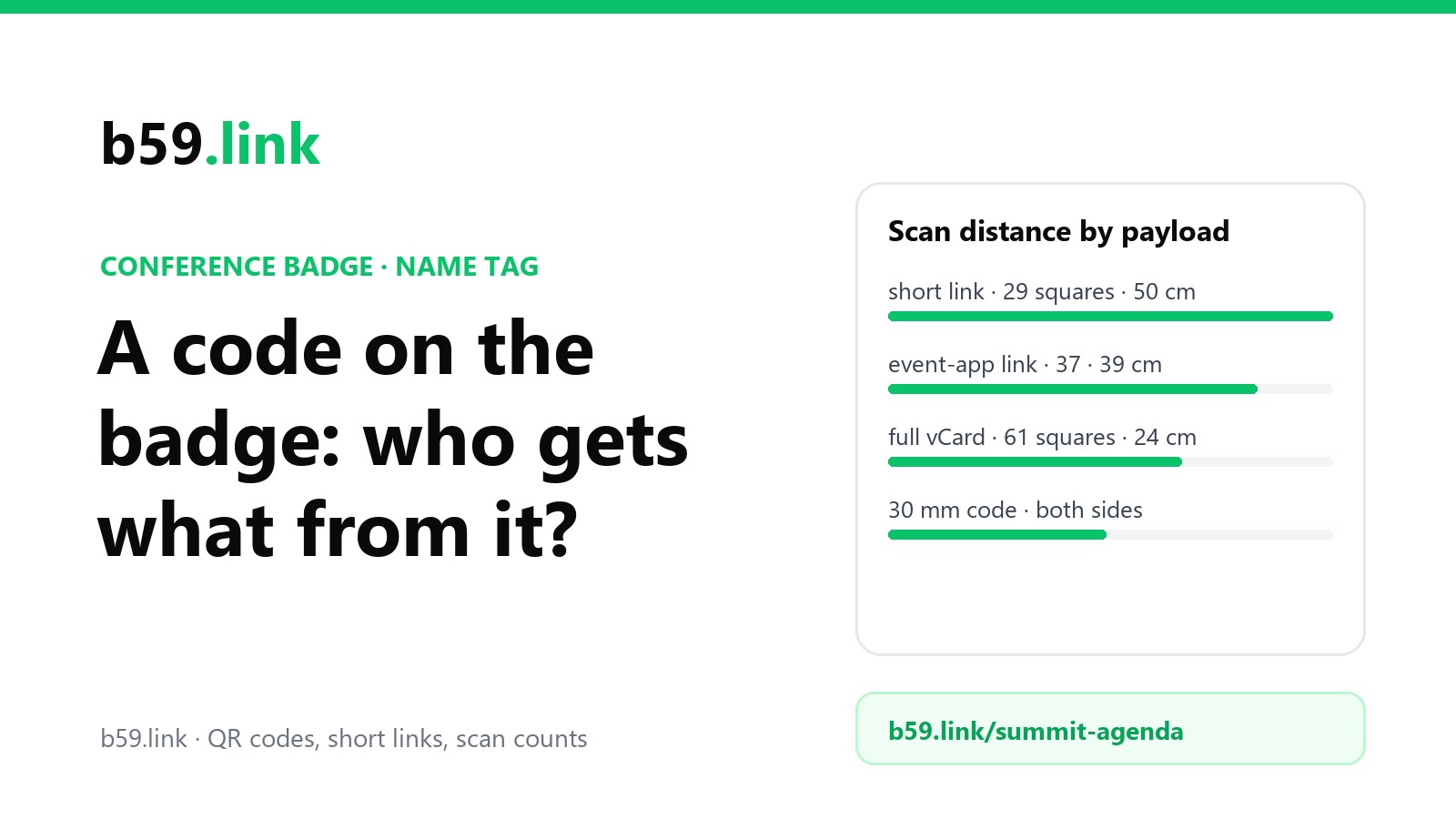
We encoded six things a badge code typically holds, at error correction level M, and worked out the size of one square in a 30 mm code (about 1.2 inches, which fits beside the name on a 4 × 3 badge). For the reading distance we used the same camera maths as our article on codes on presentation slides: a phone's main camera across about 67° and a 1,920-pixel preview frame give 1.445 pixels per millimetre at 1 metre, and the phone needs 3 pixels a square on a badge hanging at an angle (see the test below).
Two people talking at a stand are usually 60 to 100 cm apart. A short link or a registration ID can be scanned from about half a metre, which is a lean forward. A full vCard on the same 30 mm square means holding a phone 24 cm from someone's collarbone, which nobody enjoys and most people won't do. Our vCard business card article shows how each line of a vCard grows the code; on a badge the cost is worse, because the code is smaller than on a card and it's hanging off a lanyard.
The same figures for other code sizes:
Our test: a badge doesn't face you
A code on a poster faces the camera. A badge on a lanyard twists, swings and hangs at whatever angle the wearer is standing. We drew each of the six codes, rotated it at random by up to 15°, turned it away from the camera by 0°, 35° and 50°, then added blur, grey 'blacks' and noise for hall lighting, saved it as a JPEG and tried to decode it with the open-source ZXing decoder. 40 tries per cell; the figures are the share that decoded.
Facing the phone, 2 pixels a square was enough, the same as in our slide test. Turned 35° away, 2 pixels failed most of the time and 2.5 almost always worked. At 50° even 3 pixels missed sometimes, mostly on the tiny version 1 code. That's why the distances above use 3 pixels: people don't straighten their badge for you. It also means the person scanning should step round to face the badge rather than scan it from the side, which is worth one line in the welcome email.
Size and place on the badge
The name comes first. Badge printers recommend the first name at about 28 to 36 point and the company at 12 to 16 point, so it reads from about 6 feet. On a 4 × 3 inch badge (102 × 76 mm, the most common size) that leaves a lower corner for the code.
- 4 × 3 badge: a 25 to 30 mm code in a lower corner of the front, plus its white margin (4 squares: about 4 mm at version 3). With a short link it reads from half a metre.
- 4 × 6 badge (A6 is close): the front stays for the name; the back has room for a 35 to 40 mm code and a few lines of text: Wi-Fi, the agenda link in words, the venue map.
- Print the code on both sides. Badges on a single-clip lanyard flip round all day. Webex Events recommends double-sided badges, and on double-sided stock the second side costs nothing extra. If the front and back hold different codes, say on each side what the code opens ('Agenda', 'My contact').
- Print the address in words under it, for anyone whose phone won't focus or who would rather type. A short link like b59.link/summit-agenda is 22 characters; nobody will type an 80-character event-app profile link.
- Check the dots. Badge printers commonly print at 300 dpi. A 0.49 mm square (the full vCard at 30 mm) is 5.8 dots, which the printer has to round to 5 or 6, so the squares come out uneven. A 1.03 mm square is about 12 dots, and rounding doesn't matter.
Before printing hundreds, print five, hang one on a lanyard, and scan it from a step away with three different phones. It takes two minutes.
What's in the code is public
Anything in the code is readable by anyone who can see the badge: the person next to you in the coffee queue, and anyone who later zooms into a photo posted from the event. Group photos at conferences are taken constantly and posted the same day.
- A vCard on the badge puts the wearer's email and mobile number in every photo. That's fine if the attendee chose it. It isn't something an organiser should do to everyone by default.
- A registration number inside a public web address (https://event.example/a/004217) is a different problem: if the numbers run in order, anyone can change the last digit and see the next attendee's page. Use a random token in the link, not the registration number.
- A plain registration ID (no web address) is the safest: a phone camera shows a meaningless string, and only the organiser's lead system turns it into a name.
- Name and company as plain text (the SfN choice) gives away what's already printed on the badge, which is a reasonable compromise when scanners have to work offline.
When an exhibitor scans a badge, the visitor's details go to that exhibitor. ESMO's brochure tells exhibitors that delegates may refuse to have their badge scanned, and lists exactly which fields go over when someone agrees: title, first and last name, institute, department, city, country and email. Terms at other European events say that an exhibitor who scans a badge becomes an independent data controller for those details. Some US lead-system vendors simply treat handing over your badge as consent to be contacted. If your attendees come from the EU or the UK, the safer pattern is an unticked opt-in at registration, a scan the attendee agrees to at the stand, and no penalty for saying no.
What lead scanning costs, and what organisers can count
Lead scanning is usually something the show sells to exhibitors. Two real price lists:
Worked out for a stand with three staff scanning on their own phones: at the NLA show that's $400 + $200 + $200 = $800; at ESMO 2024 it's 3 × €425 = €1,275. Through ESMO's API, 300 scans would cost €825 + 300 × €1.45 = €1,260, about the same as three app codes, so the API is for exhibitors who want the leads straight in their own systems rather than a saving. For a 60-person meetup none of this makes sense, and nobody expects it.
What the organiser can count depends on which code is on the badge:
For most small events the first two rows are all you need: they answer 'did people use the agenda, and which group?' without collecting anything about anyone. Our article on one short link per flyer, post and podcast covers how to name them.
One link per attendee or one per event
One link per event is one print file for every badge, nothing personal, and you can change where it points at any time: the agenda before the event, the 'room changed' notice on day two, the slides and recordings afterwards.
One link per attendee is what event apps print: a profile page per person, opened by scanning the badge. It works well during the event, but the page lives on the event platform, and the organiser's own retention rules decide how long it stays. The European Labour Authority, for example, publishes that it deletes registration data for its Swapcard events 6 months after the last action related to the event. A badge scanned in October can open nothing by April.
If the point is that people can find each other again, the most durable link is the one the attendee owns: their own contact page or site, behind a short link they can change when they change jobs. Organisers can ask for it at registration ('a link to print on your badge, optional') rather than printing a page they'll later delete.
After the event
- Repoint the event link within a day: slides, recordings, photos and next year's date. People find badges in coat pockets for weeks.
- Don't let the short link expire with the event. Next year's badges can use a new link; last year's should still open something, even if it's 'This event has finished, here's the next one'. Our article on retiring a campaign page has the patterns.
- Close the lead system properly: exhibitors export their leads, and the registration IDs stop meaning anything outside it.
- Keep the counts. Agenda opens by day and by ticket type are next year's planning numbers.
Checklist for the badge
1. Back of the badge: one short link for the event, the same on every badge, with the address in words under it.
2. Lead scanning (if any): a plain registration ID, never a sequential number inside a public web address.
3. No vCard by default. If attendees want a contact code, let them give their own link at registration.
4. A 25-30 mm code on a 4 × 3 badge, 35-40 mm on the back of a 4 × 6, with a white margin of 4 squares.
5. Print it on both sides, and say what each code opens.
6. Test five printed badges on a lanyard with three phones, from a step away, turned at an angle.
7. On the last day, repoint the event link to slides and recordings, and keep it working.
Make one short link and QR code for your event's agenda, see opens by day and device, and repoint it to the slides when it's over. Free.
Make a QR codeGoing to a conference? Make your own contact page with a Save contact button, and print its short link on your badge or a sticker.
Make a contact pageSources
- ESMO Congress 2024, 'Lead retrieval systems (badge scanner)' brochure (CTI Meeting Technology): prices, the fields transferred, delegates may refuse a scan.
- National Lipid Association, Fall Clinical Lipid Update 2026 lead retrieval form: app licence, scanner and API kit prices.
- Society for Neuroscience, Neuroscience 2019 exhibitor prospectus, 'Lead retrieval': the QR holds first name, last name and company; offline scanners see only that.
- Webex Events help, 'Onsite badge types': tear-resistant 4 × 3 or 4 × 6 double-sided badges recommended.
- 4over4, 'What size should conference badges be?' and 'What font size works best for names on badges?': 4 × 3 as the most common size, first name 28-36 pt, company 12-16 pt.
- European Labour Authority, privacy statement for registration on the Swapcard app (2026): registration data kept 6 months after the last action related to the event.
- ISC High Performance 2025 and eventPower pages on badge-scan consent; published event terms describing exhibitors as independent data controllers.
- QR versions, square sizes and the decode test: our own, October 2026, with the segno encoder and the ZXing decoder (zxing-cpp); camera figures as in our slide article (26 mm equivalent main camera, about 67° across, 1,920-pixel frame).