A QR code on a wedding invitation has a longer life than most printed codes. It goes out on the save-the-date six months or more before the day, comes back on the invitation for the RSVP, gets scanned by a grandparent at the kitchen table and an old school friend on a train, and is still on fridges the week after the wedding when everyone wants the photos.
This guide covers what the code should open at each stage, how big it has to be on a 5 × 7 card, what foil and letterpress do to it (with our own decode test), how to tell which group of guests hasn't replied, what to do for guests who would rather type an address or post a card, and how to keep the same code useful after the day.
What the code should open, from save-the-date to thank-you
The usual guidance is: save-the-dates about six to eight months before the wedding (up to a year for a destination wedding), invitations six to eight weeks before, and an RSVP deadline two to four weeks before, so the caterer gets the final numbers and you can do the seating. Here is that schedule for an example wedding on Saturday 12 June 2027, with what the code should open at each point:
The trouble is that a printed code can't change, and the address behind it has to. If the code on the invitation holds zola.com/wedding/annaandben2027/rsvp directly, it opens that RSVP page for good, including after you've closed the RSVPs, and it can't send anyone to the photos later. If it holds a short link you control, you change where the link points at each stage and the printed cards follow.
That's the main reason to put a short link in the code even when your wedding site gives you a QR code of its own. The site's code is fine for the site. The short link lets the same code open the RSVP form in May and the photos in June.
How big the code has to be, and what makes it bigger
Invitation suites come in a few standard sizes: a 5 × 7 inch invitation (127 × 178 mm) in an A7 envelope, a 4.25 × 5.5 inch RSVP card (A2), a smaller 3.5 × 5 reply card, and 4 × 6 inch postcard save-the-dates. A code on any of them sits in a corner or at the foot of the card, where designers want it small.
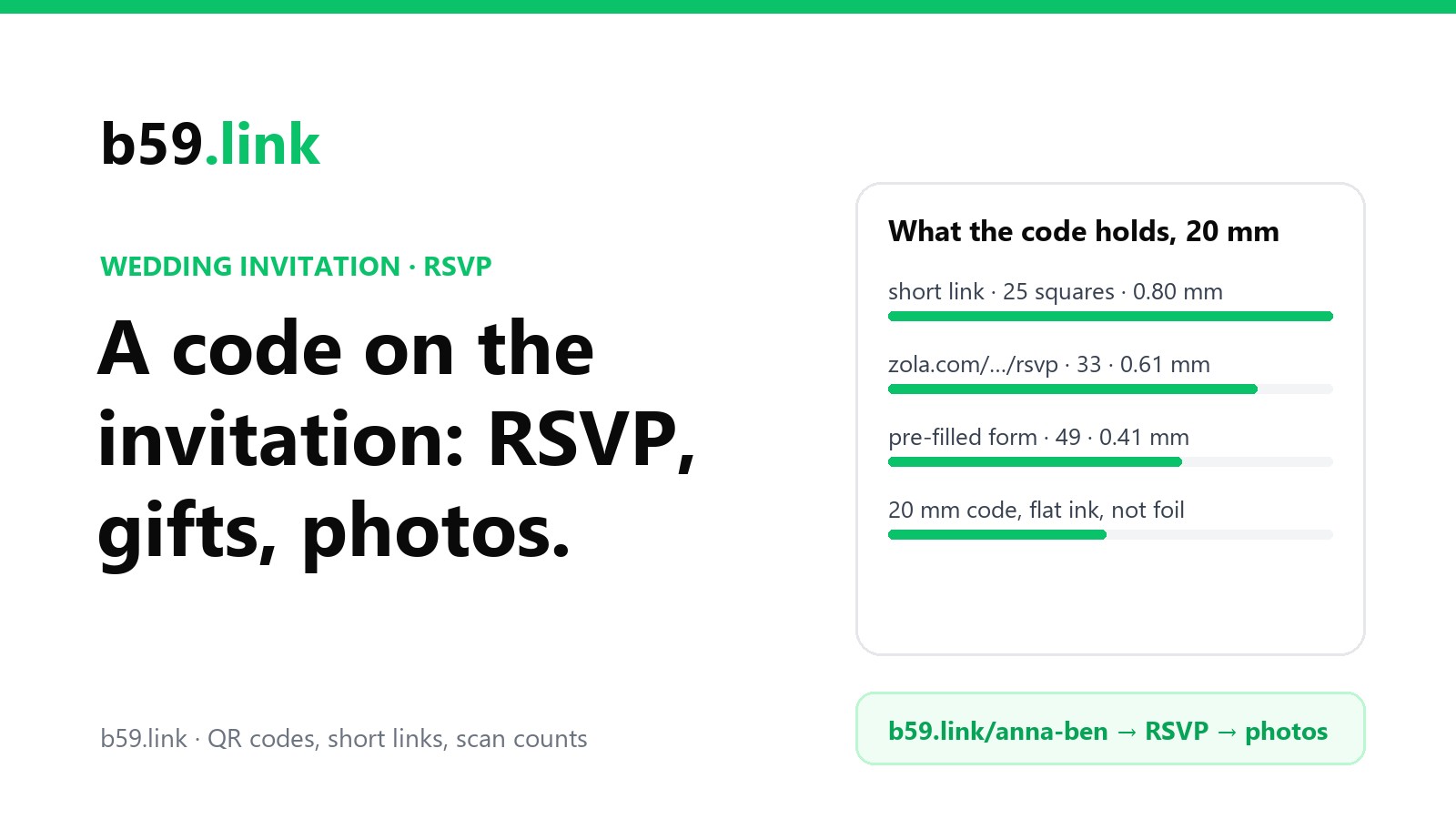
What decides the size is what the code holds. We encoded the RSVP addresses couples actually use, at error correction level M, and worked out the size of one square in an 18, 20 and 25 mm code (20 mm is about 0.8 inch, the smallest size most stationers suggest):
Read flat on a table at 25 cm, any of these will scan from a crisp black print: a phone camera at that distance gets about 5.8 pixels per millimetre, so even the 0.41 mm squares are over 2 pixels each. Size becomes a problem when the print isn't crisp black on white, which on wedding stationery it often isn't. Our guide to printing QR codes that scan covers distance and the quiet zone in general.
Foil, pale inks and letterpress: our decode test
Wedding stationery uses everything a QR code dislikes: gold and silver foil, blush and sage inks, cotton paper, and letterpress, where the plate presses the ink into the paper and squeezes it outwards. We tested each one with the open-source ZXing decoder: the Zola-style address (version 4) as a 20 mm code read at 3.5 camera pixels a square, and the pre-filled form (version 8) at 2.4, each rotated a little, blurred, with paper texture and JPEG compression, 40 tries per cell. These are a computer decoder's results in even light, not a lab with real phones.
Colours
The 'grey gap' is the difference in brightness between the ink and the paper on a 0-255 scale, the same measure our QR code maker uses to warn about colours (170 and up is safe, 60 to 99 risks failing in dim light, under 60 fails):
In even light the decoder read every coloured code, even blush pink at a grey gap of 67. Phones in a dim restaurant or under a warm kitchen bulb do worse than that, which is why our maker flags anything under 100. The foil result is the one that matters: foil is a mirror. Tilt the card under a ceiling light and part of the code turns bright, and the dark squares in that strip read as white. A reflection across about a fifth of the code stopped every foil code from reading.
We then measured how much reflection a gold foil code can take, by error correction level (the short link and the Zola-style address, 3.5 px a square, a stripe at a random angle):
Higher error correction helps a little and never enough: a stripe of light over a tenth of the code still fails most of the time. A guest can fix it by tilting the card, but most won't know that, and the ones who give up are the ones you most need replies from. Foil the names and the border, and print the code in flat ink. If the design has to be all foil, print a second, plain code on the RSVP card.
Letterpress ink spread
Letterpress pushes ink sideways as the plate bites, so dark squares grow and the white gaps between them shrink. We grew every dark square by a share of a square's width on each side, on a cotton-paper texture:
On a 20 mm version 8 code, 10% of a square is 0.04 mm of spread, which a deep impression on soft cotton can easily exceed. A short link (25 squares, 0.8 mm each) leaves twice the room. A blind deboss, where the code is pressed with no ink at all, is only shadow: in our test it read 92% of the time as a version 4 code and never as a version 8. Ask the printer for a proof with the code on it, on the real paper, and scan it with two or three phones before the full run.
One link per batch of invitations, to see who hasn't replied
Wedding sites like Zola, Joy and The Knot keep your guest list and let each guest find their own name on the RSVP page, so they already know who has replied. A Google Form or any other plain form doesn't: the replies come in with whatever name people type, and 'The Okafors' and 'Uncle Femi' may be the same household.
A simple fix is one short link per batch of invitations, each pointing at the same form with a pre-filled answer saying which batch it came from. Google Forms makes the pre-filled address for you (Get pre-filled link in the form's menu). That address is 145 characters and would need a version 8 code, but it sits behind the short link, so each printed code stays a 25-square version 2.
Example: 58 invitations in three batches, three weeks after they went out (made-up numbers to show the arithmetic):
The friends' batch is the one to chase: 28 invitations, 12 opens, 9 replies. The opens count each time the link is followed, so someone who looked and came back later counts twice. The count tells you whether a batch has looked at all; the form tells you who actually answered. A week before the deadline, send the friends' batch a text with the same link rather than calling everyone. Our article on one short link per flyer, post and podcast has more on naming links so the counts stay readable.
Don't put a guest's name in the short link itself (b59.link/femi-okafor). Anyone who sees the card can read it, and anyone can try other names.
Where the gift list goes
Etiquette guides from Emily Post to The Knot agree on one thing about gift lists: they don't go on the invitation itself. They go on the wedding website, which is exactly where the code leads. So the code doesn't need a second link for the gift list; the RSVP page or the site's home page links to it, and guests who scan to reply find it one tap away.
If the gift list is a cash fund or a list at a shop, link to it from the site, not with its own code. Gift list addresses are long, tied to one shop, and close some months after the wedding; a printed code pointing straight at one would open an expired page by the time the thank-you cards arrive.
Guests who type the address, or post a card
Pew Research's 2026 survey found 79% of US adults aged 65 and over own a smartphone, against 91% of those aged 50 to 64 and 97% of everyone under 50. The Knot's 2026 study of 10,474 couples married in 2025 put the average wedding at $34,000 and $292 a guest, which works out at about 116 guests. With, say, 25 of them over 65, about 5 won't have a phone to scan with at all, and others will have one and still prefer to type.
So print the address in words under the code, and make it one that survives being typed:
- Short and lowercase: b59.link/anna-ben is 17 characters; zola.com/wedding/annaandben2027/rsvp is 36. Short names on b59.link are case-sensitive, so keep them all lowercase. The home page picks a two-word name for you; to choose one like anna-ben, use the API or the tools for AI assistants.
- No look-alike characters: no 0 and O, 1 and l, or numbers that could be words ('2' or 'two'). Our article on links people hear rather than see has the full list, which matters when a parent reads the address out over the phone.
- A line that says what it opens: 'RSVP at b59.link/anna-ben by 22 May'.
For guests who would rather post a reply, a paper card doesn't have to go to everyone. USPS prices from October 2026: $0.82 to post a 1 oz letter and $0.65 for a postcard. For 58 invitations, pre-stamped reply envelopes cost 58 × $0.82 = $47.56 in stamps and reply postcards 58 × $0.65 = $37.70. Putting stamped reply cards only in the 10 envelopes going to grandparents and older relatives costs 10 × $0.82 = $8.20. And if the invitations themselves are square, each one pays the $0.49 nonmachinable surcharge on top: 58 × ($0.82 + $0.49) = $75.98 to send them, against $47.56 for a standard 5 × 7 in an A7 envelope.
After the day: the same code, a new page
Most of the cards will still be around the week after the wedding, on fridges and pinboards. When the RSVPs close, change where the short link points:
1. The day itself: timings, the venue map and the link to a shared album where guests can add their own photos.
2. The week after: a page saying the photographer's photos are on their way, with the guests' album.
3. When the photos arrive: the gallery. Send the link with the thank-you cards too.
4. Later: a short thank-you page. Don't let the link expire or point at a closed form; a card someone finds in a drawer in five years should still open something kind.
A changeable short link is what makes this work: the code on the card holds b59.link/anna-ben, and you change where that goes each time. On b59.link you need to be signed in to change a link's destination, so make the link while signed in. Our article on retiring a page without breaking the links to it covers the same idea for businesses.
If you'd like guests to put the day in their calendars, that's a separate link: our add-to-calendar guide explains why it belongs on the wedding site rather than in the printed code.
For stationery makers adding codes for clients
If you design or print invitations, more couples will ask for codes. A few things save trouble:
- Ask what the code should open after the RSVPs close. If the answer is 'the photos', it has to be a link the couple can change, held in their own account, not yours.
- Proof the code on the real stock and finish, foil and letterpress especially, and scan it with an iPhone and an Android before the run.
- Keep the code out of the foil, or give the RSVP card a plain one.
- Print the typed address under it, in lowercase, at a size someone with reading glasses can manage (the same size as the RSVP deadline line).
- Check that the code holds what the couple sent you. A code made by some free generators holds the generator's own redirect, not the couple's link. Our test of 77 generators' sample codes found 67 that didn't hold the destination at all.
Checklist
1. One short link you control in the code, not the wedding site's address.
2. Save-the-date: the link opens the site's home page. Invitation: the same link (or a second one) opens the RSVP form.
3. 20 mm or bigger, flat dark ink on light card, never foil; proof it on the real paper.
4. The address in words under it, lowercase, with the RSVP date.
5. For a plain form, one link per batch, pre-filled with the batch name; chase the batch that's behind a week before the deadline.
6. Stamped reply cards only for the guests who want them.
7. After the day, change the link to the photos, then a thank-you page. Don't let it expire.
Make a short link and QR code for your RSVP, see how many opened it, and change it to the photos after the day. Free.
Make a QR codeSources
- The Knot, 2026 Real Weddings Study (10,474 couples married in 2025), February 2026 release as reported: average cost $34,000, $292 per guest; stationery averages $220 for invitations with RSVP cards and $150 for save-the-dates.
- USPS Notice 123 price list (October 2026): First-Class Mail stamped letter 1 oz $0.82, stamped postcard $0.65, nonmachinable surcharge $0.49.
- Pew Research Center, Mobile Fact Sheet (survey January to June 2026, published October 2026): smartphone ownership by age.
- Emily Post's timing as quoted by D Magazine; Zola, 'When to send out wedding invitations'; Paperlust, 'Wedding RSVP deadline': invitation and RSVP timing; Emily Post Institute and The Knot etiquette pages: no gift list on the invitation itself.
- Paperlust, 'Wedding invitation size guide'; 4over4, 'RSVP card size guide': invitation, RSVP and envelope sizes.
- Google Forms Help, 'Send your form with pre-filled answers'.
- Our own calculation and decode test: segno to encode, zxing-cpp to decode, 40 tries per cell, October 2026.