A van parked outside a job sits in the same street for a day. A shop shutter is the only thing passers-by see of the shop after six. Both are free advertising space, and a QR code on them is an easy add. It's also easy to get wrong: too small to scan from the pavement opposite, lost behind reflections on the glass, or pointing at a page nobody can change once the vinyl is on.
This guide covers who can actually scan a code on a vehicle, how wide it needs to be from across the street (we worked it out from what a phone camera sees, and tested the decoder), the letters that should sit next to it, glass, perforated window film and shutters, and one link per van so you can see which one brings in work.
Who can scan a code on a van
Not the driver behind it. In the UK, holding a phone while driving costs £200 and 6 penalty points, at the lights and in a queue too, since the rules were widened in March 2022. New drivers lose their licence for it. In the US, 33 states plus DC ban hand-held phone use while driving and 49 ban texting (Governors Highway Safety Association, June 2026). A code on the back doors is an invitation to break that law, and the people it reaches aren't the ones you want anyway.
The people who can scan are on foot or parked: neighbours of the house you're working at, people walking past the car park, the customer's family. So the code goes where they stand:
You'll see wrap printers quote 30,000 to 70,000 'impressions' a day for a liveried van. That figure is credited to the US Outdoor Advertising Association of America and repeated by 3M, but we couldn't find the study behind it, so treat it as folklore. What you can count is scans, and that's covered at the end.
How wide the code must be from across the street
A phone reads a QR code from the camera's preview frame, and what matters is how many pixels of that frame each square of the code covers. Google's barcode scanning library asks for at least 2 pixels a square; a 2022 study in Sensors puts the practical floor at about 3 to 3.5. We checked the first number: we drew a short link and a long address at 1.5 to 5 pixels a square, added camera blur, noise and JPEG compression, and decoded each 40 times with ZXing, the open-source reader many apps use.
Below 2 pixels a square it falls apart quickly, and a real street adds things our test didn't: hand shake, focus hunting, low winter sun. So plan on 3 pixels a square and the sums follow. A phone's main camera (26 mm equivalent, like the iPhone 16's) sees about 67° across; spread over a 1,920-pixel preview frame, that's about 1,445 pixels per metre of width at one metre away. The short link b59.link/van-03 makes a code 25 squares wide; a long address with tracking tags (99 characters here) makes one 41 squares wide. The width each needs, not counting the white margin:
Add the white margin (4 squares on every side) and the printed square is about a third wider again. Three things fall out of that table:
- The short link halves the size you need. At 10 m, 52 cm against 85 cm. On a van side that's the difference between a code that fits beside the logo and one that is the logo.
- The 10:1 rule (code width a tenth of the distance) that printers use is roomy for a short link and about right for a long address. It's not roomy at all if the phone scans from a 720p frame, which some cheaper phones and older scanning apps do.
- Across the street is a big ask. A 52 cm code at 10 m is possible on a shutter or a large van, but most people will cross the road or zoom. The pavement side is where a code earns its place.
Our print size guide covers quiet zones and error correction in more depth, and the QR size calculator does the sum for your own link and distance.
The letters next to the code
Plenty of people won't scan a van at all. They'll take a photo of it, or remember the name and search later. So the short address and the phone number go next to the code in letters big enough to read from where people stand. Sign makers in the US work from the US Sign Council's figure of 1 inch of letter height for every 30 feet of distance, read straight on. Signs flat against a wall, read at an angle by people going past, need about three times that (1 inch per 10 feet, Garvey 2006), and a van side read from a passing car is exactly that case:
Make the address something people can say and type: b59.link/smith-plumbing beats b59.link/x7Kq2, and on b59.link short names are case-sensitive, so keep them lower case. Our article on links people hear rather than see has a checker for names that get misheard.
Codes on glass: shop windows and van windows
Ordinary glass reflects about 4% of the light at each surface when you look at it straight on, so 8% for a pane. At an angle it climbs: about 9% per surface at 60° and 17.5% at 70° (our sum from the Fresnel equations), more again towards a glancing view. That's why a window code that scans fine from straight in front fails for someone looking at it from along the pavement with the sky behind them.
Even reflection, which washes the code out evenly, is less of a problem than you'd think: in our glare test the codes still read at 2 pixels a square. A bright patch across part of the code is what breaks it, because those squares are simply gone. That's what error correction is for. At level M a code survives about 15% of its squares lost, at level Q about 25%. For a window code, choose Q: the short link above still fits in a 29-square code (version 3) at Q, while the long address grows to 49 squares.
Where the sticker goes:
- On the outside of the glass, the code sits in front of the reflections and reads best, but weather and window cleaning wear it. Fine for a van, where the panel is painted metal anyway.
- On the inside, facing out (printed mirror-reversed, 'second surface'), it's protected but the reflections sit on top of it. ZXing read a mirror-image code in our test without being told to, but don't rely on every phone app doing so: scan a proof through the actual glass before printing a batch.
- Put a solid white backing behind it on the inside. Otherwise the shop's interior, lit or dark, shows through the white squares and the contrast drops.
Perforated window film
The see-through film on bus windows and van back windows (the '50/50' or '70/30' kind with 1.5 mm holes) removes a large share of the print. Vistaprint's own guidance on its perforated vinyl puts the loss at about 40% and the smallest QR code at 85 × 85 mm, against 2 × 2 cm on solid vinyl, and its customer reviews mention codes that wouldn't scan. Put a small solid vinyl code on top of the film instead.
What the law lets you cover
Don't put anything on the front windows of a vehicle. In the UK the windscreen must let through at least 75% of light and the front side windows 70% (for vehicles first used from April 1985), and the MOT fails stickers reaching more than 10 mm into the strip in front of the driver. US commercial vehicles may carry required decals only in the bottom 115 mm (4.5 in) of the windscreen (49 CFR 393.60), and the front side windows are covered by each state's own rules. Rear windows are the place for a window code, and on a van the side panels are better still.
Shutters: seen only after closing time
A shutter code is read by people who came when you were closed. That decides what it opens: opening hours, the online shop, a booking page, an emergency call-out number. Not your Instagram, and not a page that says 'visit us in store'.
Two practical limits. First, many UK councils refuse solid and perforated roller shutters in shopping streets and ask for open grilles or internal shutters instead (Croydon, Bromley and Richmond all say so in their shopfront guidance), and an external shutter usually needs planning permission. If you can't have a solid one, put the code on the door glass behind the grille, at eye height, where the grille bars don't cross it. Second, it's dark. A code nobody can see at 9pm isn't doing its job: check it with your phone under the street light, and if the street light isn't enough, a small light over the door is.
Put the opening hours in plain text next to the code. Half the people standing there only want to know when you open, and they shouldn't need a phone for that.
One link per van, to see which one brings in work
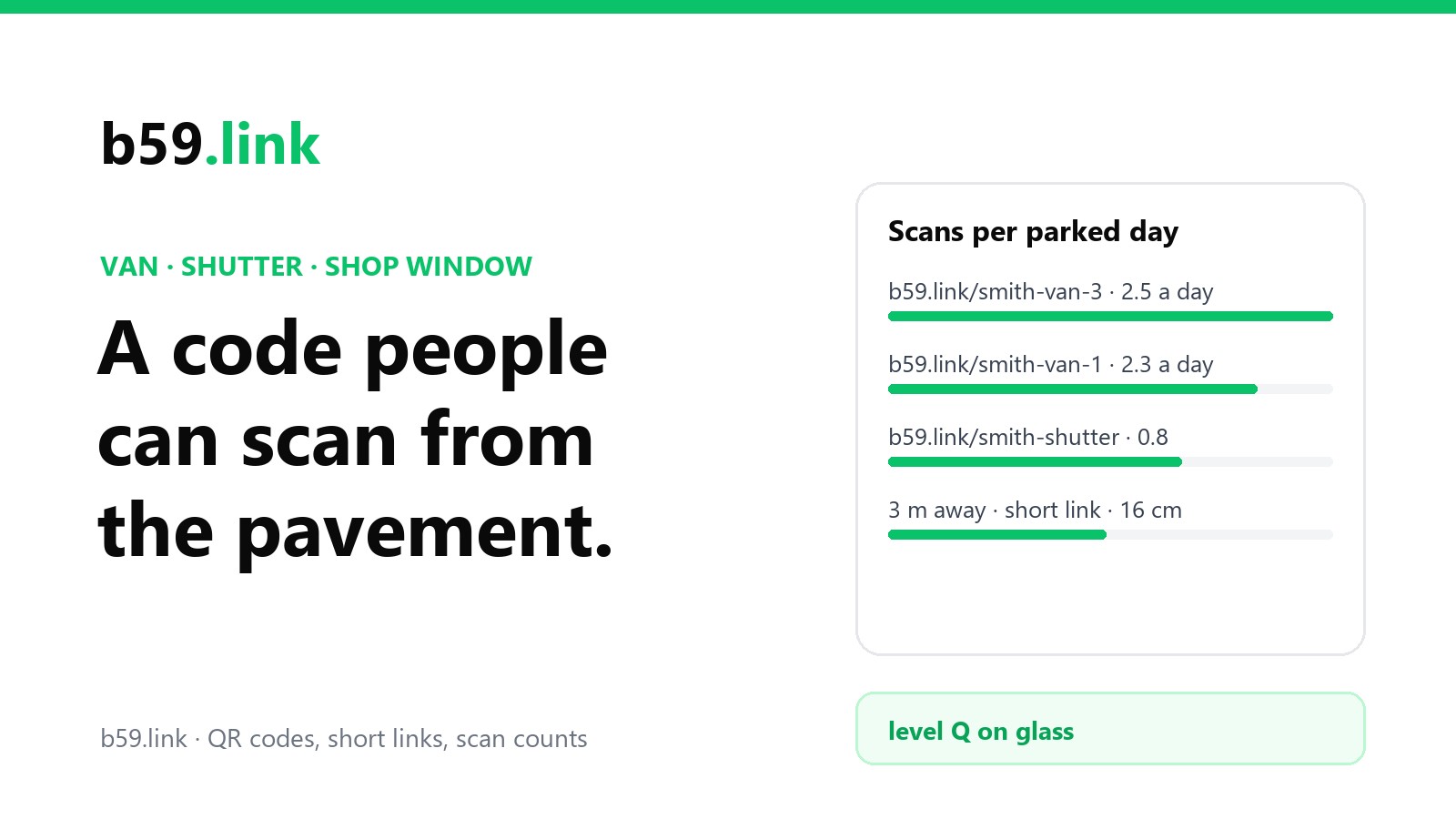
Give each van (and the shutter, and the window) its own short link, all opening the same page: b59.link/smith-van-1, smith-van-2, smith-shutter. When the page changes (new phone number, a seasonal offer, a different booking system), you change where the links point and the vinyl stays as it is. A wrap costs hundreds; changing a link costs nothing.
Counts on their own mislead, because a van that spends the week on one big job in a quiet cul-de-sac is seen by fewer people than one doing six call-outs in town. Divide by the days each was parked somewhere visible:
The link can count a phone opening the page, not the call that follows. If the page is mostly a 'Call us' button, ask callers where they found you, or give each van's page its own number if your phone system allows it. Our article on one short link per flyer, post and podcast goes through reading per-source counts, and the campaign link tool makes a set of tagged links in one go.
On b59.link each link's stats page shows clicks, visitors and the time, device and browser of each one, so you can leave out the scans you made yourself while testing the vinyl.
Checklist before the vinyl goes on
1. Decide what the code opens, one thing, and make sure that page works on a phone.
2. Make one short link per van, window and shutter; use lower case names people can say.
3. Size it: about 16 cm for the pavement at 3 m with a short link, more for anything you expect to be read across the road. Level Q for anything on glass.
4. Put the short address and phone number beside it in letters at least 4 cm high on a van side.
5. Print one proof at full size, stick it on, and scan it from the real distance with the oldest phone you can find, in sun and after dark.
6. Nothing on the windscreen or front side windows; a solid code on top of perforated film.
7. Check the counts after a month, per parked day, and swap the page behind the links whenever you need to.
Make a short link for each van, window and shutter, draw the codes, and change where they point any time without reprinting. Free.
Make a QR codeSources
- GOV.UK, 'Using a phone, sat nav or other device when driving' (£200 and 6 points; rules widened 25 March 2022); 'Tinted vehicle windows: the law' (75% and 70%).
- Governors Highway Safety Association, 'Distracted driving' state law table (June 2026).
- Google ML Kit, 'Scan barcodes with ML Kit on Android' (2 pixels per module, 1280×720 or 1920×1080 input), updated October 2026; a peer-reviewed study in Sensors (September 2022) putting the practical floor at about 3 to 3.5 pixels per module.
- Apple, iPhone 16 technical specifications (48 MP main camera, 26 mm equivalent). The 67° field of view and 1,445 px per metre are our calculation.
- US Sign Council Foundation, Guideline Standards for On-Premise Signs (2018) and Rules of Thumb (30 ft per inch); P. Garvey (2006) on wall-mounted signs, via the Interdisciplinary Journal of Signage and Wayfinding.
- Glass reflectance (4.3% per surface straight on, 9.2% at 60°, 17.5% at 70°, unpolarised light): our calculation from the Fresnel equations for n = 1.52.
- ISO/IEC 18004 error correction levels (L 7%, M 15%, Q 25%, H 30%).
- Vistaprint, perforated window vinyl product page and customer care guidance (about 40% print loss, 85 × 85 mm minimum QR size).
- 49 CFR 393.60(e) (US commercial vehicle windscreen decals); DVSA MOT inspection manual (windscreen zone A).
- Shopfront and security shutter guidance from Croydon (SPG1 addendum, 2022), Bromley and Richmond councils.
- 3M vehicle graphics warranty sheet citing the OAAA impressions figure.
- Our decode test: codes drawn with segno, blurred (0.7 px), noise added, JPEG at quality 70, decoded with zxing-cpp, 40 runs per cell, October 2026.