Most social profiles give you one line for a link, and that line has to work for everyone who reads your profile: the person who saw a reel and wants the product, the one who wants to book, the one looking for your price list, and the one who followed you three years ago and just wants to know whether you still do house calls.
There are three things you can put there. A single destination, such as your shop, your booking page or your newest piece of work. A link page, the kind made by Linktree and its many copies, with a short list of buttons. Or a page on your own website that does the same job. Each one is right for some people. This guide is about choosing between them, and about the part most people skip: finding out which entry actually gets tapped.
What the apps give you today
The "one link" rule is looser than it used to be, and it isn't the same everywhere.
- Instagram has allowed up to five links on a profile since April 2023, for every account, not just business ones. You add them under Edit profile, then Links. Only the first one is shown under your bio, with a note that there are more; a visitor has to tap it to see the rest. Links in captions still aren't clickable, which is why "link in bio" became a phrase at all. Link stickers in Stories, open to all accounts since late 2021, are the other way to send people out.
- TikTok gives the website field only to some accounts: broadly, those with enough followers (1,000 is the figure usually quoted) or a registered business account, and not in every country. If Edit profile shows no field for a website, your account doesn't have it yet, and nothing you paste into the bio text will be clickable.
- X, Threads, LinkedIn and YouTube each have their own link fields on the profile, and they change from time to time. Check what yours shows rather than trusting a guide written a year ago, including this one.
So on Instagram you could, in theory, skip the question and add five links. In practice the first one does most of the work, because it's the only one people see without an extra tap. The question of what goes first doesn't go away.
A single destination
If most of your followers come for one thing, send them straight there. A bakery that takes pre-orders, a photographer whose booking calendar is the whole business, a musician with a new album out: one link, one tap, done.
A single destination is the shortest path, and every extra step loses people. It also opens inside the app's own browser, which is a browser your visitor has never used before: they're signed out of everything and their saved cards aren't there. Our article on what the in-app browser changes goes through what breaks there. One page that loads fast and doesn't need a sign-in does better than a chain of pages.
The cost is that everyone else gets the wrong page. The person who wanted your opening hours lands on the album, and has to find their own way.
Use a single destination when you can name the one thing most visitors want, and when that thing changes rarely enough that you'll keep the link current. Which brings up the main way single links go wrong: the bio still points at last spring's sale, which now shows "this offer has ended" or a 404. If the link in your bio is a short link you can repoint, you change where it goes without editing the profile, and so does every old post and printed flyer that carries the same short link.
A link page
A link page is a small page with a stack of buttons: shop, book a table, newsletter, latest video. It's the answer when your followers really do come for different things, and it's quick to set up without a website.
Three things are worth knowing before you make one.
- It's one more tap, and one more page to load inside the in-app browser. Each button then opens a third page. That's fine for someone who is curious and patient, and a loss for someone who was one tap away from buying.
- It lives on someone else's domain. If the service changes its free plan, puts its own branding on your page, or closes, the link in all your old posts and printed material goes with it. We wrote about what that looks like in practice when goo.gl and git.io shut down.
- Long lists don't get read. The buttons near the top get most of the taps. Six entries is already a lot on a phone screen. Every entry you add makes the others a little harder to find.
If you use one, order it by what people come for, not by what you'd like them to want. Put the newest thing at the top only if it really is what most people are after. Take dead entries off. A link page with an expired event at the top tells people the page isn't looked after.
A page on your own site
The same idea, on your own domain: yourshop.com/links or yourname.com/hello. It looks like a link page and behaves like one, but it's yours. It keeps working if you switch tools, it can match the rest of your site, and it can carry anything you like: opening hours, a map, a phone number that opens the dialler, a sign-up form.
You don't need anything clever. A plain page with a heading, a sentence about who you are and five big buttons is enough, and it loads faster than most link-page services because it doesn't carry their scripts. If you already have a site with a simple page builder, add a page and leave it out of the menu.
The drawback is that someone has to build and look after it. If you don't have a website and don't want one, a link page service is a reasonable choice, as long as the link you put in your bio is one you control (more on that below).
How to choose
A rough rule that works for most small businesses and freelancers:
- One thing, most of the time: a single destination. Change it when the main thing changes.
- Two or three things, all of them current: on Instagram, add them as separate profile links, first one most important. Elsewhere, a link page or your own page.
- Four or more things, or things that change weekly: a page on your own site if you have one, a link page if you don't.
- Selling one product hard this month: a single destination for the month, then back to the page.
Then test it. The only reliable way to choose is to look at which entries get tapped, and that's what most bio setups can't tell you.
Counting which entry gets the tap
The apps tell you a little. Instagram's professional dashboard counts taps on the links in your profile, but as a total over a period, not per destination, and only for creator and business accounts. A link page service usually shows clicks per button, on its side. Your own site's analytics will show visits to the link page, but the visits that follow from it often arrive with no referrer and get filed as "direct", for reasons we cover in one short link per channel.
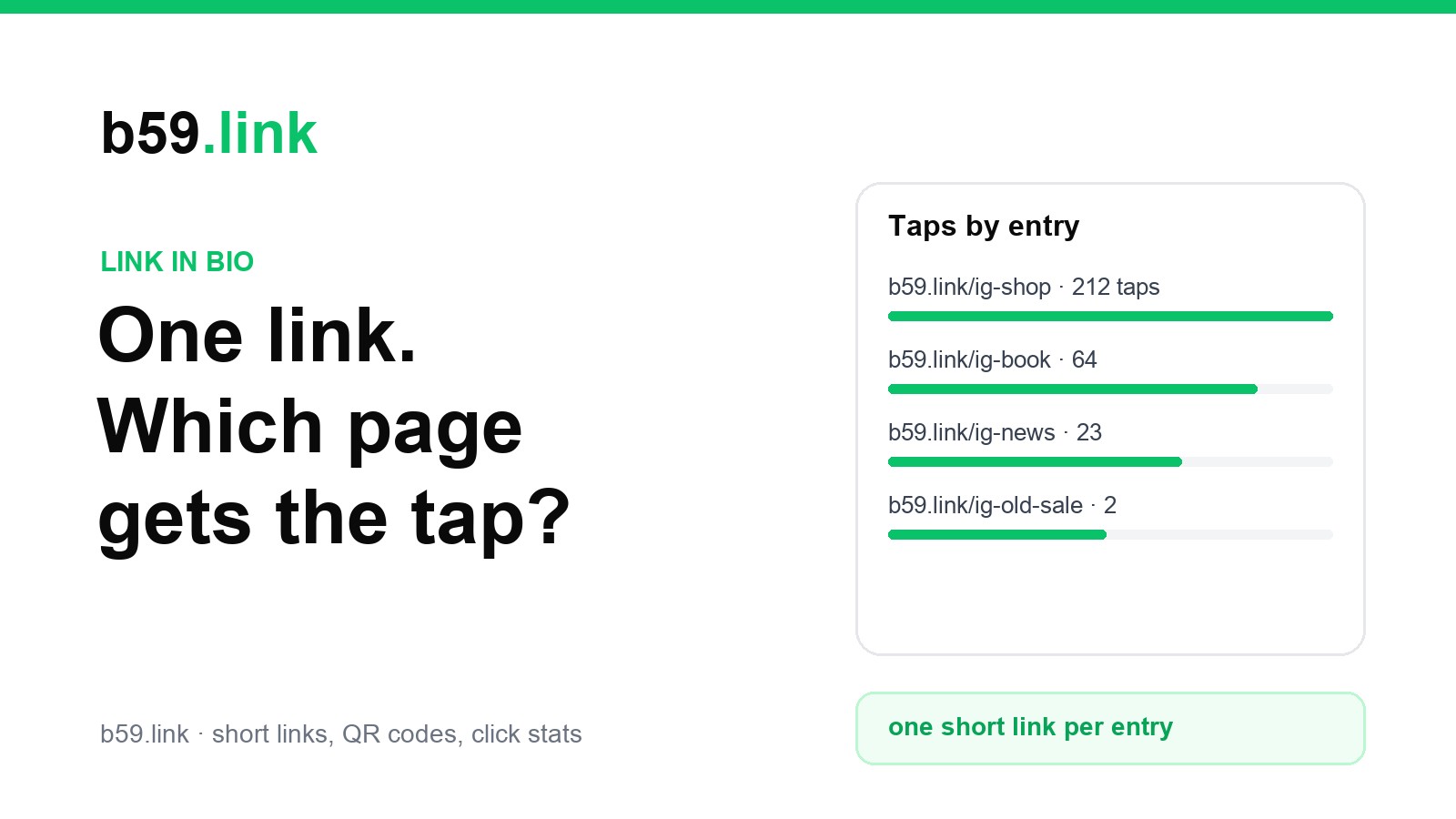
The plain fix is a separate short link for each entry. Instead of putting yourshop.com/products/winter-boots behind the "Shop" button, put b59.link/ig-shop. Instead of the booking page, b59.link/ig-book. Each short link counts its own clicks, so after a month you can read off what your bio is for:
That list is the whole decision. If one entry gets most of the clicks, it should be first, or it should be the only link. If one gets almost none, take it off. Here, the old sale has earned its removal.
A few habits make the numbers worth reading:
- A different set of names per app. ig-shop on Instagram and tt-shop on TikTok tell you which audience wants what. Using the same short link everywhere gives you one number and no story.
- Not the same link in posts and in the bio. If a link sticker in a Story uses ig-shop too, you can't tell the bio from the Story.
- Bots count too. Link preview fetchers and security scanners open links, so a handful of clicks on a new link isn't a signal. Compare entries with each other over weeks, not days.
- Keep the names readable. People sometimes type a link they saw on a screenshot. ig-shop survives that; ig-x7Kq2 doesn't.
Change the destination, keep the link
Short links have a second use in a bio: you can change where they go. Put b59.link/ig-main in the bio once. When the main thing changes, from the summer collection to the Christmas pre-order page, repoint the short link and leave the profile alone. The same goes for links you've printed on packaging, flyers or a shop window, which is where this matters most: a printed link can't be edited.
If you use a link page service, this is also your way out. Put a short link you control in the bio, pointing at the link page. If you ever leave that service, repoint the short link to your own page, and every old post, printed card and saved screenshot still works.
Setting it up with b59.link
A simple way to do all of this, free and without an app:
1. Sign in at b59.link, so the links are on your account and you can change them later.
2. Open the campaign link builder. Give the campaign a name like bio, paste the destination, and list the places, such as Instagram and TikTok. It makes one short link per place, with matching UTM tags so your own analytics can tell them apart too, and you can choose each short name.
3. For a link page with several entries, make one short link per entry the same way, named after the app and the entry (ig-shop, ig-book).
4. Put the short links in the bio or behind the buttons on your link page.
5. After a month, look at the clicks for each link in My links, reorder or remove entries, and repoint any link whose page has changed.
Then check the link the way a follower would: open your profile on a phone you're not signed in on, tap it inside the app, and see where you land.
Sources: Instagram's five profile links, announced by Meta in April 2023, as reported by PetaPixel and TechRadar. TikTok's website link eligibility as described in TikTok's in-app settings and help pages (follower and business-account conditions, availability by region). Link-tap counts in Instagram's professional dashboard as shown to creator and business accounts in the app.
Make one short link for each place your bio link lives, choose their names, and see which one gets the tap.
Make bio links