Contact list docs
Keep contacts in one place. Add them by hand or through a sign-up panel, and export the list as CSV at any time.
Read the article · Open contact list tool
Add contacts
On the Entries tab, paste addresses into Add emails: one per line or separated by commas, up to 5,000 at a time. You get back how many were added, already on the list and not valid.
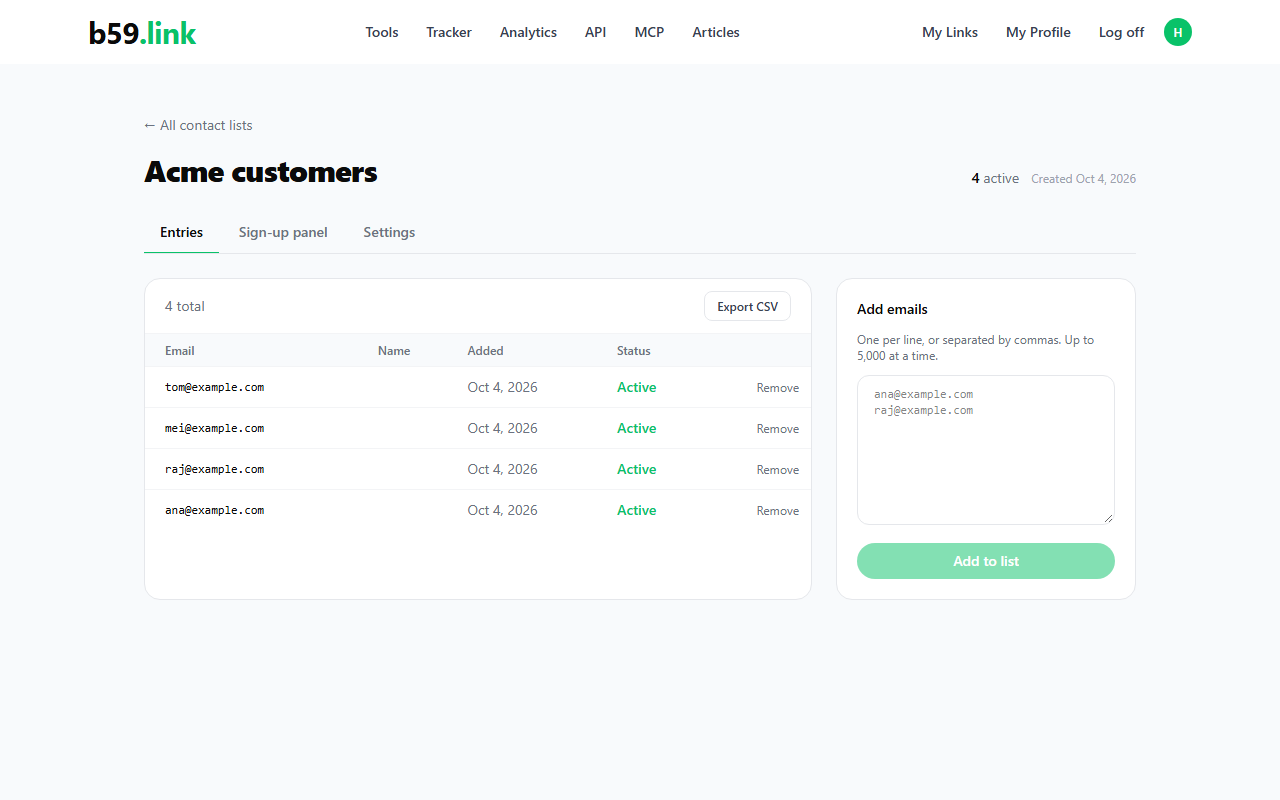
Sign-up panel
The Sign-up panel tab has the snippet. People who join appear in the same table with source embed.
html<div data-b59-list="<list id>"></div>
<script src="https://b59.link/sdk/b59-lists.js" async></script>
Export CSV
Export CSV downloads every contact, including unsubscribed ones. A name that starts with =, +, - or @ gets a leading apostrophe so spreadsheets show it as text.
csvemail,name,source,unsubscribed,created_at
ana@example.com,Ana,manual,no,2026-10-04T09:12:00
mei@example.com,Mei,embed,yes,2026-10-04T11:03:00
React component
For a React site, copy this component into your project. It posts to the same endpoint and needs no package.
tsx// B59Signup.tsx: copy into your React project. No packages needed.
import { useState, type FormEvent } from "react";

const LIST_ID = "<list id>";

export default function B59Signup({ buttonLabel = "Join" }: { buttonLabel?: string }) {
  const [email, setEmail] = useState("");
  const [name, setName] = useState("");
  const [website, setWebsite] = useState(""); // honeypot: people never fill it
  const [message, setMessage] = useState("");
  const [status, setStatus] = useState<"idle" | "busy" | "done" | "error">("idle");

  async function submit(e: FormEvent) {
    e.preventDefault();
    setStatus("busy");
    try {
      const res = await fetch(`https://b59.link/api/lists/public/${LIST_ID}/join`, {
        method: "POST",
        headers: { "Content-Type": "application/json" },
        body: JSON.stringify({ email, name: name || null, website }),
      });
      const body = await res.json();
      if (!res.ok) throw new Error(body.detail ?? "Something went wrong. Try again.");
      setMessage(body.position ? `${body.message} You're #${body.position} on the waitlist.` : body.message);
      setStatus("done");
    } catch (err) {
      setMessage((err as Error).message);
      setStatus("error");
    }
  }

  if (status === "done") return <p>{message}</p>;

  return (
    <form onSubmit={submit} style={{ maxWidth: 420, display: "grid", gap: 8 }}>
      <input type="email" required value={email} onChange={(e) => setEmail(e.target.value)} placeholder="you@example.com" aria-label="Email" />
      <input value={name} onChange={(e) => setName(e.target.value)} placeholder="Name (optional)" aria-label="Name" />
      <input tabIndex={-1} autoComplete="off" aria-hidden="true" value={website} onChange={(e) => setWebsite(e.target.value)} style={{ position: "absolute", left: -9999, opacity: 0 }} />
      <button type="submit" disabled={status === "busy"}>{status === "busy" ? "Sending…" : buttonLabel}</button>
      {status === "error" && <p style={{ color: "#ef4444" }}>{message}</p>}
    </form>
  );
}

// Use it: <B59Signup buttonLabel="Join the waitlist" />
Public join endpoint
The sign-up panel calls this endpoint. You can call it from your own form too. No login is needed.
httpPOST https://b59.link/api/lists/public/<list id>/join
Content-Type: application/json

{"email": "ana@example.com", "name": "Ana"}

→ 201 {"message": "Thanks! You're on the list.", "position": 1}
Limits and privacy
- Up to 50 lists per account.
- Adding emails by hand: up to 5,000 addresses at a time. Duplicates and invalid addresses are reported back, not stored.
- Lists are private to the account that made them. Only that account can see or export the entries.
- The sign-up form has a hidden field: bots that fill it are dropped without an error.