A question we keep getting from people who use the b59.link page-view tracker: can I put the same tag on all my pages, or do I need one tracker per URL? Several of you are already doing the first, so here is the definitive answer, how it works under the hood, and the three situations where a single tag can quietly stop telling pages apart.
Short answer: yes, one tag per site is the intended setup. Create one tracker for your domain, paste the same snippet on every page, and b59.link records each view under the page it happened on. You don't need, and shouldn't create, a tracker per page.
What one tag looks like in the stats
Our own site pilotbase.pro runs exactly this setup: one tracker, the same tag on the home page, every article and the admin. Its public stats page splits the views by page on its own:
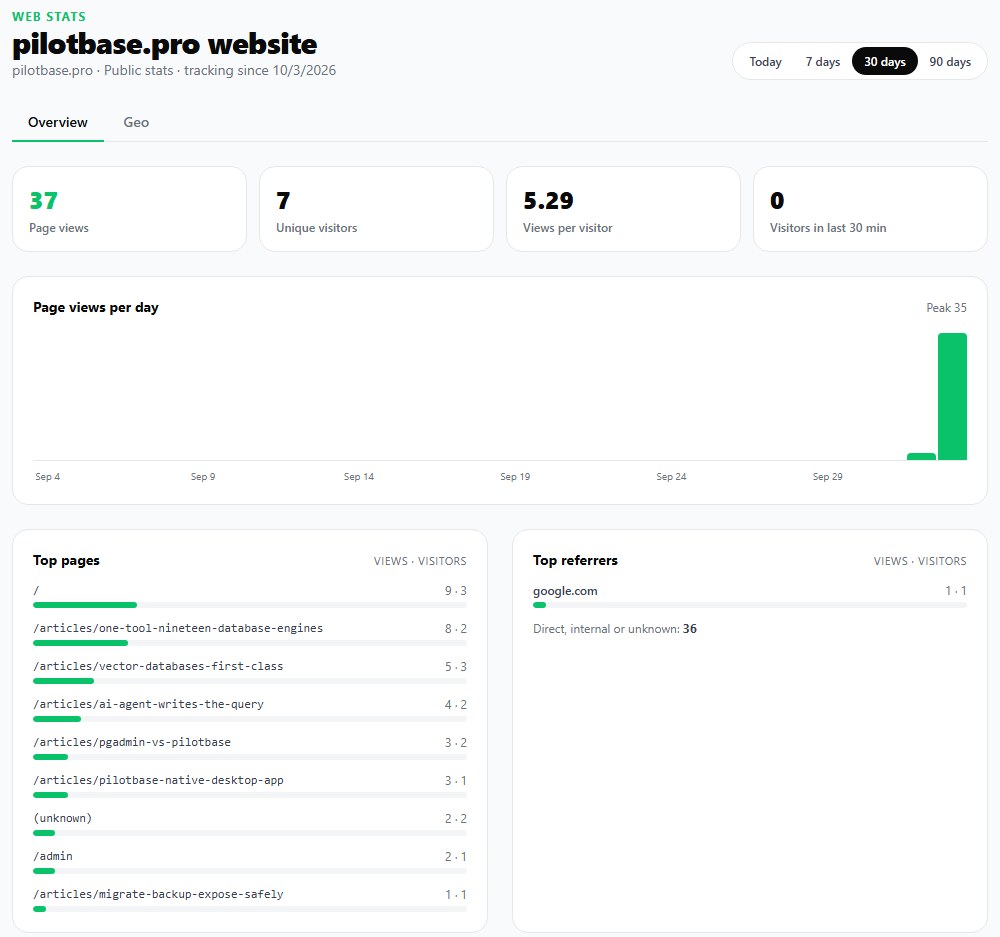
Totals at the top (page views, unique visitors, views per visitor) are for the whole site. Top pages breaks them down by path, and Recent page views shows each view with its page, where it came from and the device. A visitor who reads five pages counts as five views and one visitor, because visitors are counted per tracker per day, not per page.
How b59.link knows which page a view came from
The tag is a 1x1 image loaded from b59.link/tag. Every time a page loads it, we need the address of that page. There are two ways it arrives:
The recommended JavaScript snippet reads location.href and sends it in the u= parameter, plus document.referrer in r= so you also see where visitors came from. This works in every browser because the page tells us its own address.
The plain image tag (for places that don't allow scripts) can't send the address itself. We read it from the Referer header the browser attaches to the image request. The tag carries referrerpolicy="no-referrer-when-downgrade" so browsers that honour it send the full page address.
From that address we keep the host and the path only. Query strings and #fragments are dropped, so /pricing?utm_source=newsletter and /pricing#plans both count as /pricing. That is deliberate: Google Analytics 4 keeps the query string in its page location by default, a common reason the same landing page shows up as several rows there. With b59.link a campaign link doesn't split your page stats.
What a single tag covers
A tracker belongs to one domain, and it counts views on that domain and all of its subdomains: example.com, www.example.com, blog.example.com and shop.example.com all report into the same tracker, and the stats list each host so you can see which part of the site the traffic went to.
Views from any other domain are ignored. If someone copies your tag onto their site, or you paste it onto a second website you own, those views don't show up. That keeps your numbers clean, and it means each separate website needs its own tracker. An account can hold up to 100.
Three things that make one tag lose track of pages
1. The image-only tag in Safari and private windows
If you use the plain image tag, some browsers send only your domain, never the full page address. Safari's tracking prevention downgrades every cross-site referrer to the site's origin, whatever policy the page asks for. Firefox does the same for users with Strict tracking protection and in private windows (since Firefox 93). Chrome and Edge honour the tag's policy today, but their default for other sites is also origin-only.
When that happens the request reaches us as https://example.com/, so every page those visitors open is counted as /. Views and visitors stay correct; only the page breakdown suffers.
Fix: use the JavaScript snippet wherever you can. Where scripts aren't allowed but the page is built on a server (a CMS template, a static site generator, a page you render yourself), put the page address into the tag:https://b59.link/tag?id=YOUR_TRACKER_ID&u=https%3A%2F%2Fexample.com%2Fpricing
The u= value must be URL-encoded. Our shared content admin does exactly this: set the tracker ID once and every article gets a tag with its own address built in.

2. Single-page apps that change the URL without reloading
The inline snippet runs once per full page load. React, Vue, Next.js and similar apps often switch pages by changing the URL with the History API and never reload, so the snippet only sees the first page. Hosted tools such as Plausible handle this by listening for those URL changes in their script; with b59.link you fire the tag again on each route change:new Image().src = "https://b59.link/tag?id=YOUR_TRACKER_ID&u=" + encodeURIComponent(location.href)
In Next.js, run that from a small client component with usePathname() in the root layout. That is how b59.link, pilotbase.pro and osec.one track their own pages.
3. Two tags on the same page
It's easy to end up with the tag twice: once in the site-wide template and once added by a CMS or page builder to a single article. Both fire within a second, and until now that page counted two views per visit. You can see it in our own data from before the fix, where some article views come in pairs from the same device:
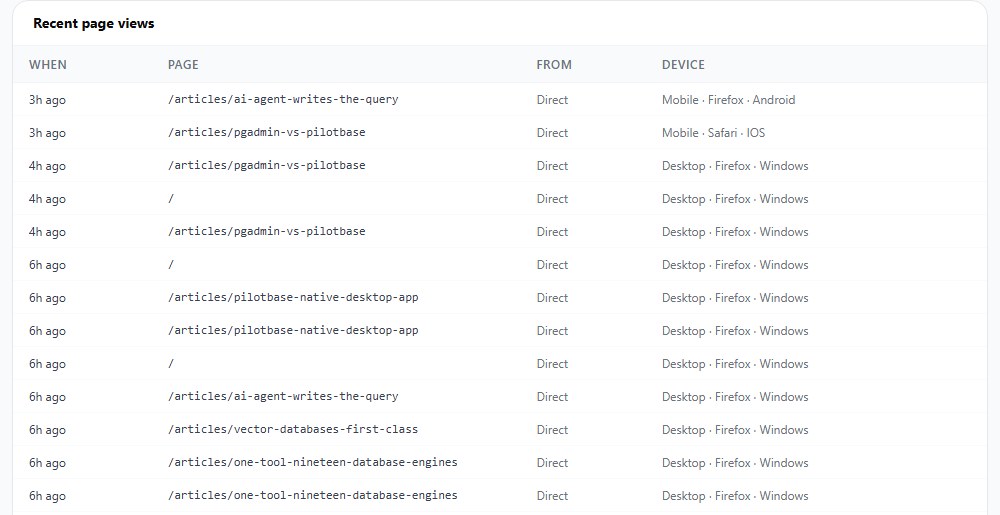
Since this week, b59.link counts the same visitor viewing the same page within 10 seconds once. Duplicate tags no longer inflate your numbers, and neither does a quick double reload. Real repeat visits, a minute later or to another page, still count. Removing the extra tag is still the tidy option.
About the "(unknown)" row
If the tag is requested with no page address at all (no u= and no Referer), we can't attach a page, so the view is listed as (unknown). It usually means the image was loaded somewhere that strips the referrer completely, such as some email clients or a page with a strict referrer setting. Adding u= to that tag fixes it.
Checklist
1. One tracker per website, created at b59.link/tracker. Subdomains share it.
2. The same snippet on every page, ideally the JavaScript one, just before </body>.
3. Image-only tag? Add u= with the page URL wherever your server builds the page.
4. Single-page app? Fire the tag again on each route change.
5. Check Top pages after a few visits: one row per page means it's working. Everything under / means the page address isn't reaching us.
Free web stats for your site: one tag, no cookies, no visitor IPs stored, and every page counted on its own.
Create a trackerSources: MDN: Referrer-Policy, WebKit: Preventing Tracking Prevention Tracking (ITP referrer downgrade), Mozilla: less restricted referrer policies ignored for cross-site requests, web.dev: Referer and Referrer-Policy best practices, Plausible: SPA support, KP Playbook: GA4 page path vs page location.